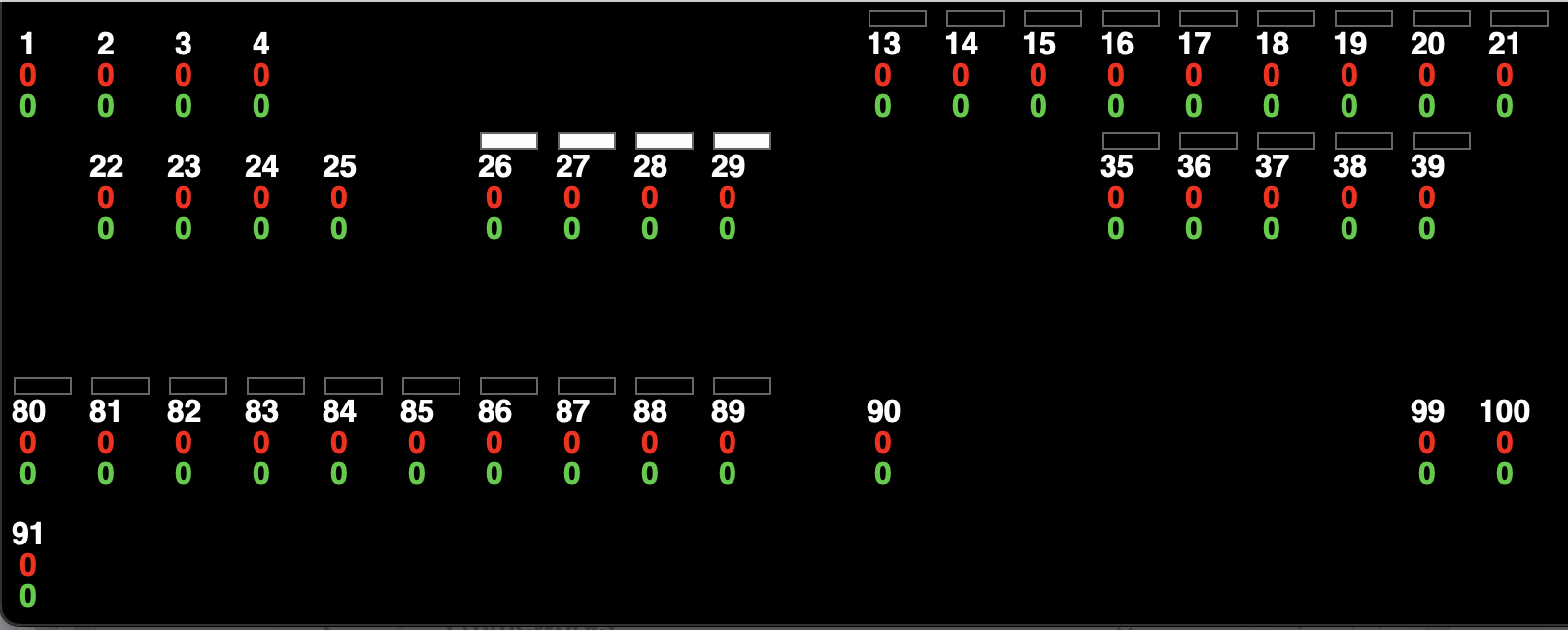
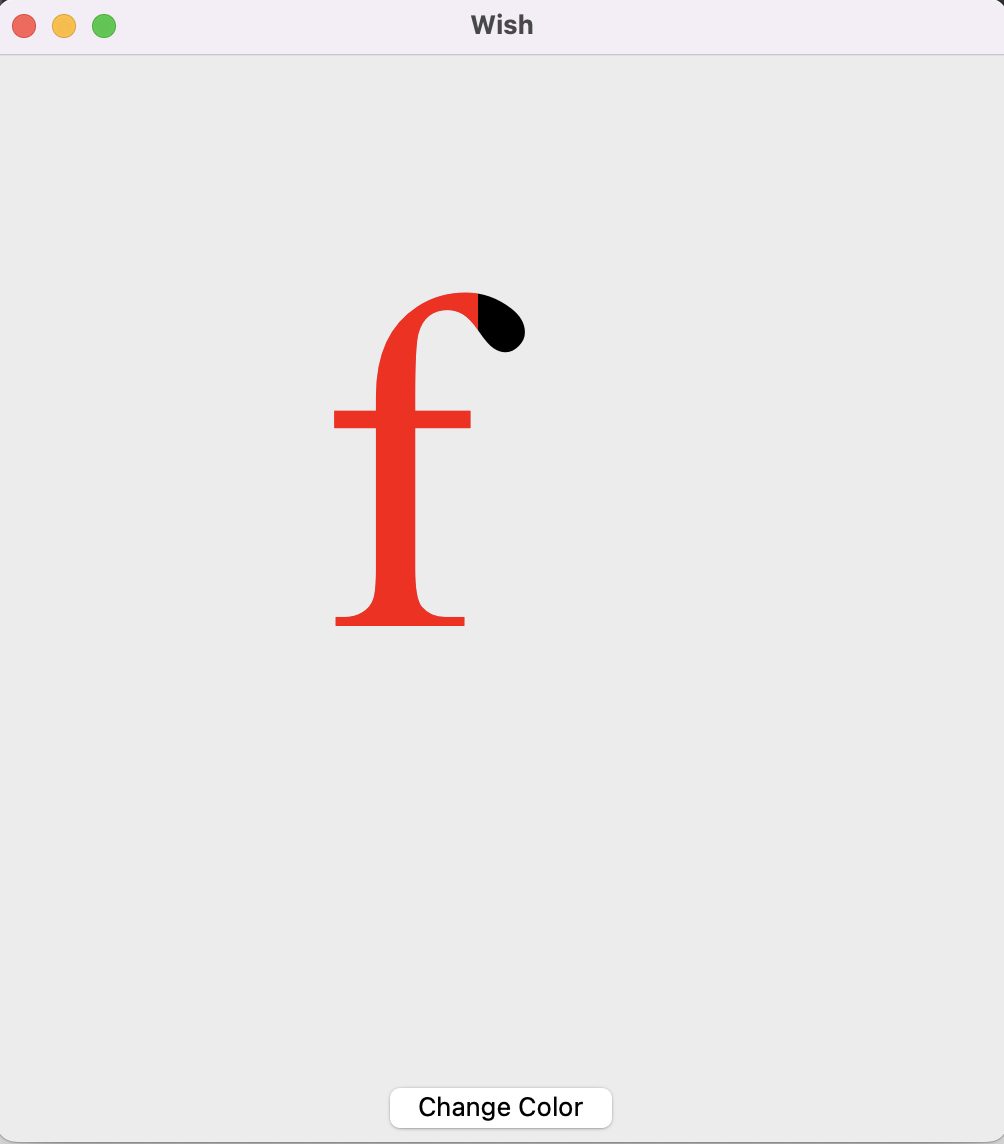
| Ticket UUID: | bbc7ea3245acde8f2a526ec58362418b9c6c3f90 | |||
| Title: | Aqua : canvas item partially refresh | |||
| Type: | Bug | Version: | trunk | |
| Submitter: | nab | Created on: | 2024-07-23 12:17:33 | |
| Subsystem: | 05. Canvas Items | Assigned To: | marc_culler | |
| Priority: | 5 Medium | Severity: | Important | |
| Status: | Closed | Last Modified: | 2024-09-25 17:17:35 | |
| Resolution: | Wont Fix | Closed By: | marc_culler | |
| Closed on: | 2024-09-25 17:17:35 | |||
| Description: |
Hi, on macOS12 (Intel) with latest trunk, the following script which should change the colour of a letter is doing 2/3 of the job until I resize the window. package require Tk pack [canvas .c -width 500 -height 500] font create .f -family "Times New Roman" -size 180 set t [.c create text 200 200 -text f -font .f] pack [button .b -text "Change Color" -command ".c itemconfig $t -fill red"] -side top -pady 5 best regards, Nicolas | |||
| User Comments: |
marc_culler (claiming to be Marc Culler) added on 2024-09-25 17:17:35:
I agree.  The bounding box is being computed correctly for its real purpose,
which is positioning text within the canvas.  It is being used incorrectly
as a clipping rectangle when rendering the text in the canvas.  The correct
clipping rectangle would be slightly larger on the right hand side so the
overhanging bits of text would be rendered when a single text item is
re-displayed.

I see two obstacles to fixing the rendering.

1. I don't know where in the code that clipping is happening.

2. For angled text the extended clipping region may be more complex to
calculate.  (Or maybe not, if the angled text is first being rendered as
an image, and then the image is rotated and copied to the screen.)
jan.nijtmans added on 2024-09-25 10:15:47: I think the lesson here is that you cannot just change the bounding box calculation. For some operations (updating the screen), the excess area needs to be included. For other operations (centering) we don't want to include the excess area (because we don't know how big it is, it shouldn't influence the centering). So we need at least a new flag for making this distinction. jan.nijtmans added on 2024-09-24 14:33:21: I agree on not listing this one. The currently listed "known bugs" are _my favorite_, it's not an objective list at all. So, feel free to bring forward others that should be mentioned, or items you think that should not be mentioned! marc_culler (claiming to be Marc Culler) added on 2024-09-23 22:02:44: I agree with François, on both topics. fvogel added on 2024-09-23 20:57:58: My opinion is to remove this bug from the list. This is not new (I can see it in 8.6.9 on Windows for instance). Further that that, this "Known bug" section is puzzling to me since there are a lot more "known bugs" in the present Tk repository than the 12 items listed in changes.md. No idea about what criterion led to highlight those 12 among the many others. dgp added on 2024-09-23 16:51:42: Looking for advice on whether this issue should continue to be listed in the "Known Bugs" of Tk 9.0.0 nab added on 2024-09-23 15:02:00: Hi Marc, I've applied the .c create rectangle [.c bbox $t] and understood what you mean. I'm lucky to only use F in my app :) best regards, nicolas marc_culler (claiming to be Marc Culler) added on 2024-09-23 14:53:30: Hi Nicolas, I don't think that any of the changes I proposed are a good idea. I think we should leave things as they are. I also don't think this is a bug. Rather it is a limitation of the text capabilities of the Canvas. I think you can do what you want with your app once you know the rules. Here are the rules (for horizontal text). 1. When you position text in a Canvas you are positioning the bounding box, not the text itself. 2. The text may extend out of the bounding box on the right side. When that happens (e.g. when the text ends in "f") updating the text item will not update the part outside of the box. (When updating the entire canvas, the part outside the box will be updated.) One fix for text that does not fit in its box is to add a space at the end. 3. If the text is not positioned where you want it, then just adjust the coordinates. Expect the adjustment amount to be different for different text strings. (And don't ignore -anchor.) In your app, each text item is a number and your anchors appear to be in the centers of the boxes. The columns look fine, but it looks to me like you just need to shift each column a few pixels to the right. Since there are only a hundred or so different numbers, the worst case would be that you need to make a table to lookup how many pixels to shift each column, based on the top number. But I don't think that will be necessary. marc_culler (claiming to be Marc Culler) added on 2024-09-23 05:10:34: I have downgraded the priority and the severity of this issue. One reasonable approach to this, which is hinted at by the manual, is to simply accept that text may extend outside of its bounding box. This is analagous to the fact that when "f" is adjacent to "i" on a line of text (with the Times Roman font) the top of the "f" overlaps the dot on the "i". (And never mind about ligatures.) If one accepts that, then the real question becomes: why does the text rendering sometimes get clipped to the bounding box (as happens in Nicolas' script when you press the button) while at other times it does not get clipped to the bounding box (as happens when the "f" is drawn for the first time and also when the window is resized)? The inconsistency is the real issue. If the drawing were always clipped to the bounding box then a person who wanted to display some text ending in "f" on their canvas would simply add a space at the end. Of course this would mean that, with the anchor being in the center, the text would not quite look centered on the anchor point. But that could be dealt with by moving the point. This does mean that a Tk Canvas is not suitable to function as a professional quality typesetting system. But that is not a reasonable expectation anyway. The TeXLive package is such a typesetting system and it is a 5GB download. Typesetting is difficult. Ask Donald Knuth. So I think the focus of this ticket should be on the inconsistency. Why does the text get clipped in some contexts and not in others? Note to Nicolas: You can see what is going on with the bounding box if you add this line in your script: .c create rectangle [.c bbox $t] Try it with other letters besides "f" to get the picture. nab added on 2024-09-23 04:20:20: Hi Marc, I've tested checkin https://core.tcl-lang.org/tk/info/41edaee84b9bd1e1 The 'f' letter is fully drawn with red colour and it does not hurt my app. I've tested checkin https://core.tcl-lang.org/tk/info/037c968c95855762 The 'f' letter is fully drawn with red colour but the letter is not displayed at the good place and it hurts a lot my app :) please find attached a screen shot of my app where square should be aligned with text. ++ Nicolas marc_culler (claiming to be Marc Culler) added on 2024-09-22 23:02:01: OK. Now it works. marc_culler (claiming to be Marc Culler) added on 2024-09-22 22:48:20: There is only one problem with my proposal. It doesn't work. Please stay tuned. I think I know what I did wrong. marc_culler (claiming to be Marc Culler) added on 2024-09-22 22:43:46: Now I have a proposal for how to fix this. This is platform independent and specific to the Canvas widget. The idea is that ComputeTextBbox should simply extend the bounding box a little bit to the right to account for the fact (and it *is* a fact) that the correct bounding box may be a bit wider than the width computed by Tk_TextWidth. Making the bounding box extend a bit to the right is harmless. Any pixels which are drawn to the right of the last pixel of the text will be transparent, so drawing them will not damage anything. How much is a bit? Well, it depends on the font size and on the font. The amount that I chose was the ascent of the font, according to its metrics. That number is available to ComputeTextBbox, it is proportional to the size of the font, and it is surely larger than the "overhang" of any letter like "f" in most, if not all, of the fonts available in Tk. I have committed this fix in the bug-7ea3245acd branch. marc_culler (claiming to be Marc Culler) added on 2024-09-22 21:03:47: It may be worth mentioning that a workaround for this script is to use: set t [.c create text 200 200 -text "f " -font .f] marc_culler (claiming to be Marc Culler) added on 2024-09-22 20:55:34: Looking more closely I see that CTLineGetTypographicBounds also computes ascent, descent and leading if pointers are provided for storing those values. marc_culler (claiming to be Marc Culler) added on 2024-09-22 20:51:58: Apple also provides CTLineGetImageBounds for measuring the height and width of a line of text. But it requires a graphics context. It would be feasible to provide a context if Tk_MeasureChars had a TkWindow argument. If Tk is actually trying to arrange that, say, a 12 point font has the same size in every window and on every platform then it would be necessary to take into account the resolution of the monitor where the window is being displayed. So it would make sense to pass the window to Tk_MeasureChars. I am not sure how the values returned by CTLineGetImageBounds and CTLineGetTypographicBounds compare (apart from the fact that the latter only computes the width of the line, not the height). marc_culler (claiming to be Marc Culler) added on 2024-09-22 19:45:44: This seems plausible François. I know that it is possible for a glyph to extend outside of its "bounding box" and I also know that you cannot compute the width of a block of text by adding the widths of the characters, even if there are no blank spaces. This is due to kerning (https://en.wikipedia.org/wiki/Kerning). I would have expected the platform specific functions to account for all of these issues. But they are complex issues. So maybe they don't. fvogel added on 2024-09-22 19:10:23: I'm wondering if the answer is simply to be read in the man page for "font measure": font measure font ?-displayof window? text Measures the amount of space the string text would use in the given font when displayed in window. [...] The return value is the total width in pixels of text, not including the extra pixels used by highly exaggerated characters such as cursive “f”. [...] [font measure] is built on Tk_TextWidth(), which calls Tk_MeasureChars(), which makes a platform-specific call to compute the width of the given text (on windows this is GetTextExtentPoint32W(), on macOS I believe this is CTLineGetTypographicBounds()). If those platform-specific calls suffer from the defect described in man [font measure], then that would explain the issue and the platform differences we see. jan.nijtmans added on 2024-09-22 18:36:43: I cannot reproduce this problem on MacOS Monterey 12.7.6, not on any branch. That makes it difficult to contribute to this ticket. But the discussion so far suggests there might be more places where "points" and "pixels" are not used correctly. fvogel added on 2024-09-22 18:29:03: Oh, and my observations on different platforms mean that neither [f01fe7aa] nor [24758c18] are totally correct, because these proposals are either platform-independent or specific to macOS. fvogel added on 2024-09-22 18:25:04:
> The problem is MacOS specific, so I expect no changes in the generic code. The problem was perhaps reported for trunk and macOS, but I don't think anyone said it's specific to macOS. Apart from macOS I'm seeing it also on Windows with 8.6.9, core-8-6-branch and trunk, but not on Linux with core-8-6-branch or trunk with xft (but it is here witout xft although red coverage here is rather 95% than 75%). So it is an old problem, at least on Windows (translation: not blocking for Tk 9.0). >> That implies that there was a change to the macosx code which accomplished >> this "uniformization" of the platforms. Can you please say which commit >> contains that change? > > https://core.tcl-lang.org/tk/fdiff?v1=249e9b8d999b50ba&v2=b963ab414f180d05 The corresponding commit comment [f42742a8] does not say a word about this change. It says "When translating "nsFont pointSize" to Tcl_WideInt, use correct rounding." This case highlights, once more, the need for accurate commit comments. Thanks. marc_culler (claiming to be Marc Culler) added on 2024-09-22 17:55:35: That change makes the test script work and the "f" appears in the same place. But it does a lot of other strange things. For example, in the widget demo the hyperlinks have underlining that extends far past the end of the text. (Maybe the underline is 25% longer than the text?) jan.nijtmans added on 2024-09-22 17:26:01: Remark: the changes in line 19/20 was unintended, but does no harm jan.nijtmans added on 2024-09-22 17:24:32: Can you try [24758c1878cd3b9c|this]? The problem is MacOS specific, so I expect no changes in the generic code. marc_culler (claiming to be Marc Culler) added on 2024-09-22 17:18:30: > The reason that [nsFont pointSize] was multiplied with FACTOR is > because it appears to return the pixelsize, not the pointsize. We > want it really to be the pointSize. Of course, if the "point" in "pointSize" were an Apple point, rather than an Adobe point, then the pointSize would be equal to the pixelsize, as long as you were not using a Retina display. On a Retina display the pointSize, in Apple points, would be half of the pixelsize in hardware pixels. marc_culler (claiming to be Marc Culler) added on 2024-09-22 17:12:10: I pushed an implementation of Jan's suggestion in branch bug-7ea3245acd. It does make the entire "f" turn red. But I don't think that it is a correct solution to this problem. For one thing, it affects the position of the text in the canvas. Of course, it is hard to determine which position is correct. But with this change the text in the "Canvas item types" demo is not contained in the "Text" box anymore. In the test script for this ticket the "f" appears in a different location. jan.nijtmans added on 2024-09-22 16:58:42: The reason that [nsFont pointSize] was multiplied with FACTOR is because it appears to return the pixelsize, not the pointsize. We want it really to be the pointSize. > That implies that there was a change to the macosx code which accomplished this "uniformization" of the platforms. Can you please say which commit contains that change? https://core.tcl-lang.org/tk/fdiff?v1=249e9b8d999b50ba&v2=b963ab414f180d05 marc_culler (claiming to be Marc Culler) added on 2024-09-22 16:34:52: While we agreed that "the height is correct" I don't believe that to be true. The height is large enough to make the top of the "f" red. But the height of the "f" is not the full point size of the font. So I now am pretty sure that the height is also being computed incorrectly. marc_culler (claiming to be Marc Culler) added on 2024-09-22 16:24:15: in GetTkFontAttributesForNSFont the FACTOR is multiplied by the property [nsFont pointSize] to convert it to a Tk font size. Apple's documentation for [NSFont pointsize] says: Discussion If the font has a nonstandard matrix, the point size is the effective vertical point size. I hope everyone finds that to be self-explanatory. I don't. marc_culler (claiming to be Marc Culler) added on 2024-09-22 16:18:04: Changing FACTOR to 1.0 seems to have no effect on this issue. marc_culler (claiming to be Marc Culler) added on 2024-09-22 16:12:36: I think I answered my own question. The change was here in tkMacOSXFont.c
starting on line 218:
static void
GetTkFontAttributesForNSFont(
NSFont *nsFont,
TkFontAttributes *faPtr)
{
NSFontTraitMask traits = [[NSFontManager sharedFontManager]
traitsOfFont:nsFont];
faPtr->family = Tk_GetUid([[nsFont familyName] UTF8String]);
#define FACTOR 0.75
faPtr->size = [nsFont pointSize] * FACTOR;
faPtr->weight = (traits & NSBoldFontMask ? TK_FW_BOLD : TK_FW_NORMAL);
faPtr->slant = (traits & NSItalicFontMask ? TK_FS_ITALIC : TK_FS_ROMAN);
Jan's suggestion was to "multiply by 4/3 somewhere". My suggestion is
to do it right there, as follows:
#define FACTOR 1.0
marc_culler (claiming to be Marc Culler) added on 2024-09-22 16:07:05: Jan, You say "In Tk 8.6 on MacOS, 1 pixel = 1 pt." and "In Tk 8.7 and 9.0 this changed: 1 pixel = 0.75pt on all platforms." That implies that there was a change to the macosx code which accomplished this "uniformization" of the platforms. Can you please say which commit contains that change? marc_culler (claiming to be Marc Culler) added on 2024-09-22 16:01:12: There is ample room for confusion about this. I say that because Apple uses the term "point" to mean the basic unit of the screen coordinate system (which are expressed as floats in macOS). The size of a hardware pixel on a Retina screen is 0.5 points x 0.5 points. And of course it was already confusing a confusing unit in the world of typography. Long before Adobe declared that a point was 1/72 in, the size of a point used by printers in America was 1/72.27 in. But just about every country had its own "standard". The wikipedia article https://en.wikipedia.org/wiki/Point_(typography) has a great summary of the history. Incidentally, after a clean rebuild of Tk I again see the "f" 75% red. jan.nijtmans added on 2024-09-22 15:26:22: > What I'm seeing is that the width of the "f" is being computed at about 75% of the correct value and the height is correct. This gives a hint. On Windows and UNIX (with scaling factor 1.0), 1 pixel = 0.75pt. Int Tk 8.6 on MacOS, 1 pixel = 1 pt. That was the reason for visual differences between MacOS and other platforms. In Tk 8.7 and 9.0 this changed: 1 pixel = 0.75pt on all platforms. So, I wouldn't be surprised hearing the width calculation is done in points in stead of pixels (which would are off by a factor 4/3). This exactly explains the observed 75% = 3/4. Proposed solution: just multiply with a factor 4/3 somewhere to correct the width calculation. marc_culler (claiming to be Marc Culler) added on 2024-09-22 14:49:20: When I first tested with this script I got exactly what the image shows. But now, with the current tip of main, the "f" stays black when I press the button. I know what the computed size is from print statements that I added. (But the behavior is the same with or without the print statements.) I can't explain the change. fvogel added on 2024-09-22 10:46:16: (which is exactly like the snashot attached by the OP) fvogel added on 2024-09-22 10:45:33: > The behavior has changed since this ticket was first reported. I'm not observing this, neither on macOS 14.7 Sonoma (whether aqua or Xquartz) nor on macOS 15.0 Sequoia (aqua). What I'm seeing is that the width of the "f" is being computed at about 75% of the correct value and the height is correct. marc_culler (claiming to be Marc Culler) added on 2024-09-22 04:21:18: I have figured out that the problem here is that the size of the canvas text item is being computed incorrectly. The behavior has changed since this ticket was first reported. At that time the width of the "f" was being computed at about 75$ of the correct value and the height was correct. Now it is worse. The computed width is 2 and the computed height is 0, so nothing changes when the button is pressed. This seems like a blocking issue for the Tk 9 release, so I am increasing the priority and severity. marc_culler (claiming to be Marc Culler) added on 2024-08-24 22:12:33: Hi Nicolas, Wow. That is my idea of a great bug demonstration script! I can reproduce the issue on macOS 14 as well, by the way. Maybe the canvas is computing the bounding box of the text item incorrectly. My recollection is that, when redrawing an item, a canvas widget clips the drawing to the bounding box of the item. So an incorrect bounding box would explain what we are seeing. I would guess that the bounding box has the right size, but it is shifted left a bit. (Or it might be something totally different.) Let me see what I can learn from your script. nab added on 2024-08-24 16:30:20: attached a pict of what I got on my computer (with latest trunk) | |||
Attachments:
- Capture d’écran 2024-09-23 à 06.14.57.png [download] added by nab on 2024-09-23 04:20:44. [details]
- Capture d’écran 2024-08-24 à 18.28.51.png [download] added by nab on 2024-08-24 16:30:40. [details]