| Ticket UUID: | 61cb40b01bbc7000eab1dd93f76bb736e8484f47 | |||
| Title: | Scrolling a canvas or text with embedded windows can cause artifacts with tcl/tk 9.0.1 Aqua | |||
| Type: | Bug | Version: | 9.0.1 | |
| Submitter: | EricBrunel | Created on: | 2025-02-18 09:41:55 | |
| Subsystem: | 05. Canvas Items | Assigned To: | marc_culler | |
| Priority: | 5 Medium | Severity: | Important | |
| Status: | Closed | Last Modified: | 2025-03-02 16:51:01 | |
| Resolution: | Fixed | Closed By: | fvogel | |
| Closed on: | 2025-03-02 16:51:01 | |||
| Description: |
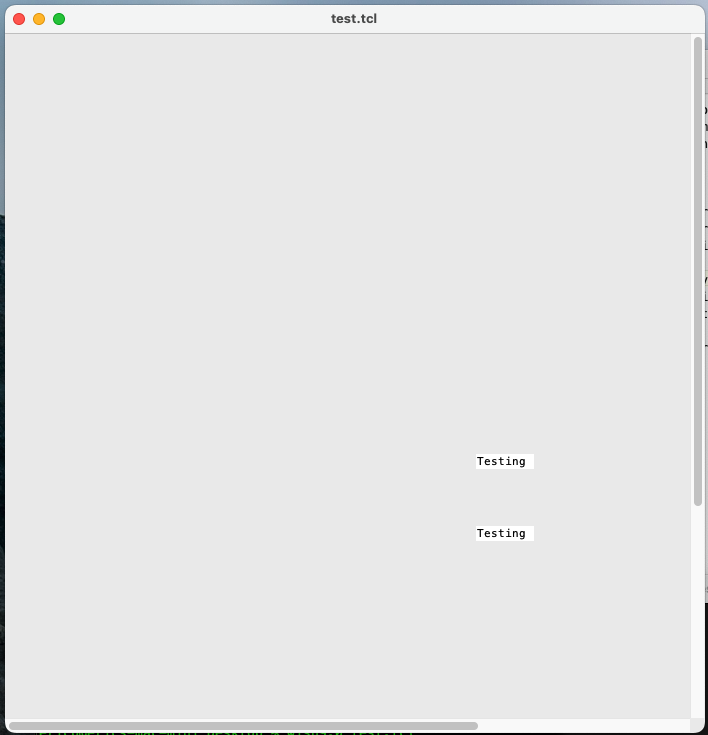
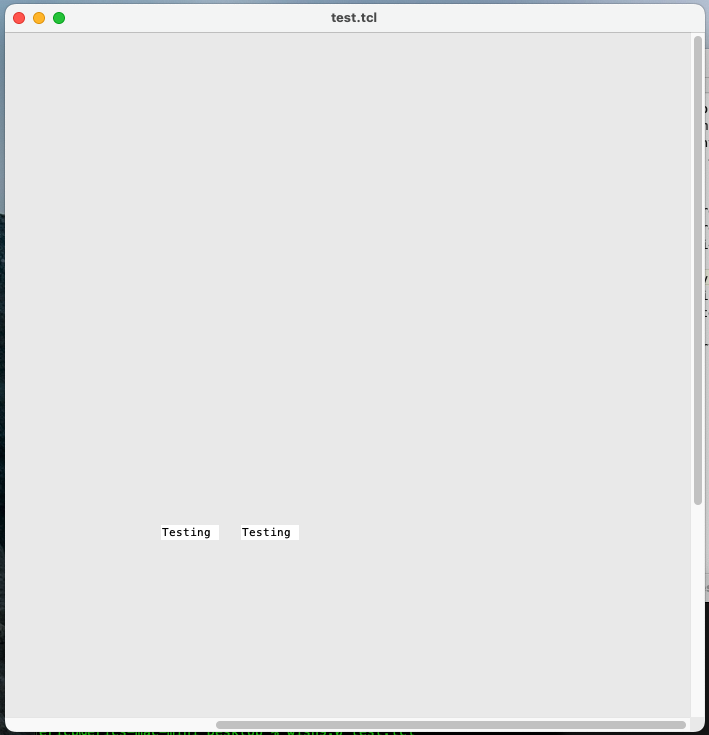
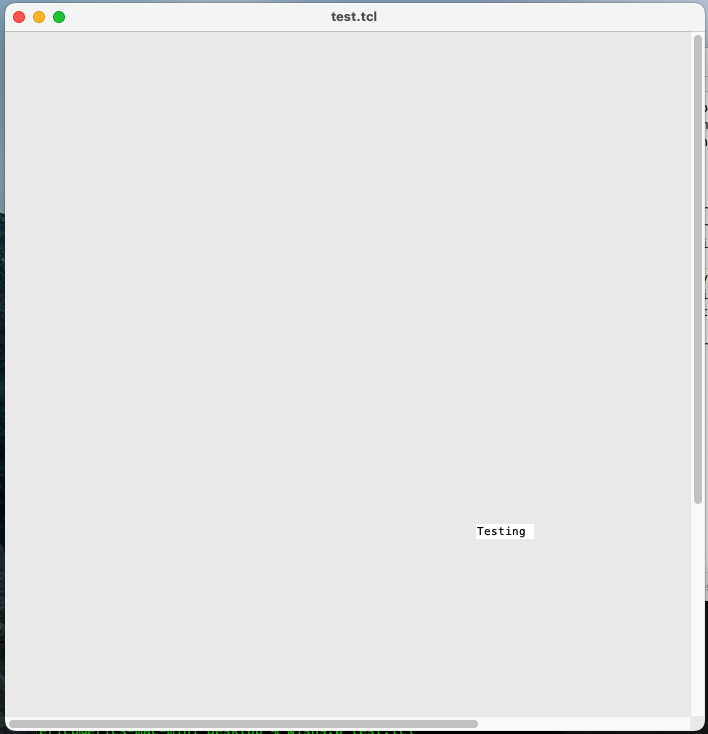
With tcl/tk 9.0.1 built from source on a mac Mini with macOS 13.2, if I run this script: then scroll the canvas using the scrollbars either horizontally or vertically, I'm getting "echoes" of the text window displayed in the canvas, especially when I scroll rapidly. These are just graphical artifacts, they're not active. This problem does not happen with the same script and the same tcl/tk version built from source either on Linux or Windows, so this seems to be a macOS-specific problem. I've attached screenshots of the problem: one of the window as it appears initially, one after a horizontal scroll, and one after a vertical scroll. | |||
| User Comments: |
fvogel added on 2025-03-02 16:51:01:
The displayProcs for text widget items all share the same signature so that they can be generically called through chunkPtr->displayProc() regardless of their type. Because of this common signature, some arguments of some displayProcs may be unused in their implementation. This is the case for TkTextEmbWinDisplayProc(), but also for other display procs (e.g. EmbImageDisplayProc(), for a different parameter)

So I understand your rationale for having changed dlPtr->spaceAbove by zero in the call to TkTextEmbWinDisplayProc() for the legacy widget.

The revised widget does not call EmbWinDisplayProc(), but the more generic chunkPtr->layoutProcs->displayProc(), so at first sight there is no point in propagating this change to revised_text. I could nevertheless propagate the change to revised_text because the call to chunkPtr->layoutProcs->displayProc() occurs only if chunkPtr->layoutProcs->type == TEXT_DISP_WINDOW, i.e. it will only call EmbWinDisplayProc(). But all balanced I decided no to do that.
marc_culler (claiming to be Marc Culler) added on 2025-03-01 14:45:19: > why did you replace the 4th argument dlPtr->spaceAbove by zero (in > addition this call applies to platforms other than macOS) ? I did that because kTextEmbWinDisplayProc lists the 4th argument as unused. I guess there was a time when that argument was used and the appropriate value for it was spaceAbove. But I thought it was misleading to be providing a value for an unused argument. fvogel added on 2025-03-01 10:18:57: Fix now propagated to the revised text widget branch, see [2793972a]. Indeed the issue has now disappeared with revised_text as well. One thing I didn't merge is this change you made in the call to TkTextEmbWinDisplayProc: why did you replace the 4th argument dlPtr->spaceAbove by zero (in addition this call applies to platforms other than macOS) ? I believe this must be a mistake. I didn't correct it in trunk so far but I think it should. Unless I missed something, can you explain? fvogel added on 2025-03-01 09:26:13: I can confirm that revised_text branch has the same issue. tkTextDisp.c in the revised_text branch has a lot of differences compared to the trunk version. A brutal attempt to merge trunk into revised_text results in conflicts as I expected. Looking at the commit fixing the present issue however, i.e. [0ffbdfe2], it should not be very difficult to propagate the fix to the revised text widget. I will give it a try. fvogel added on 2025-02-28 21:05:39:
> I have a lot of trouble in fossil trying to view the version
> of a file in a specific branch.  Can you tell me how to do that (I mean
>  on the web, without having to update my working directory to the branch)?
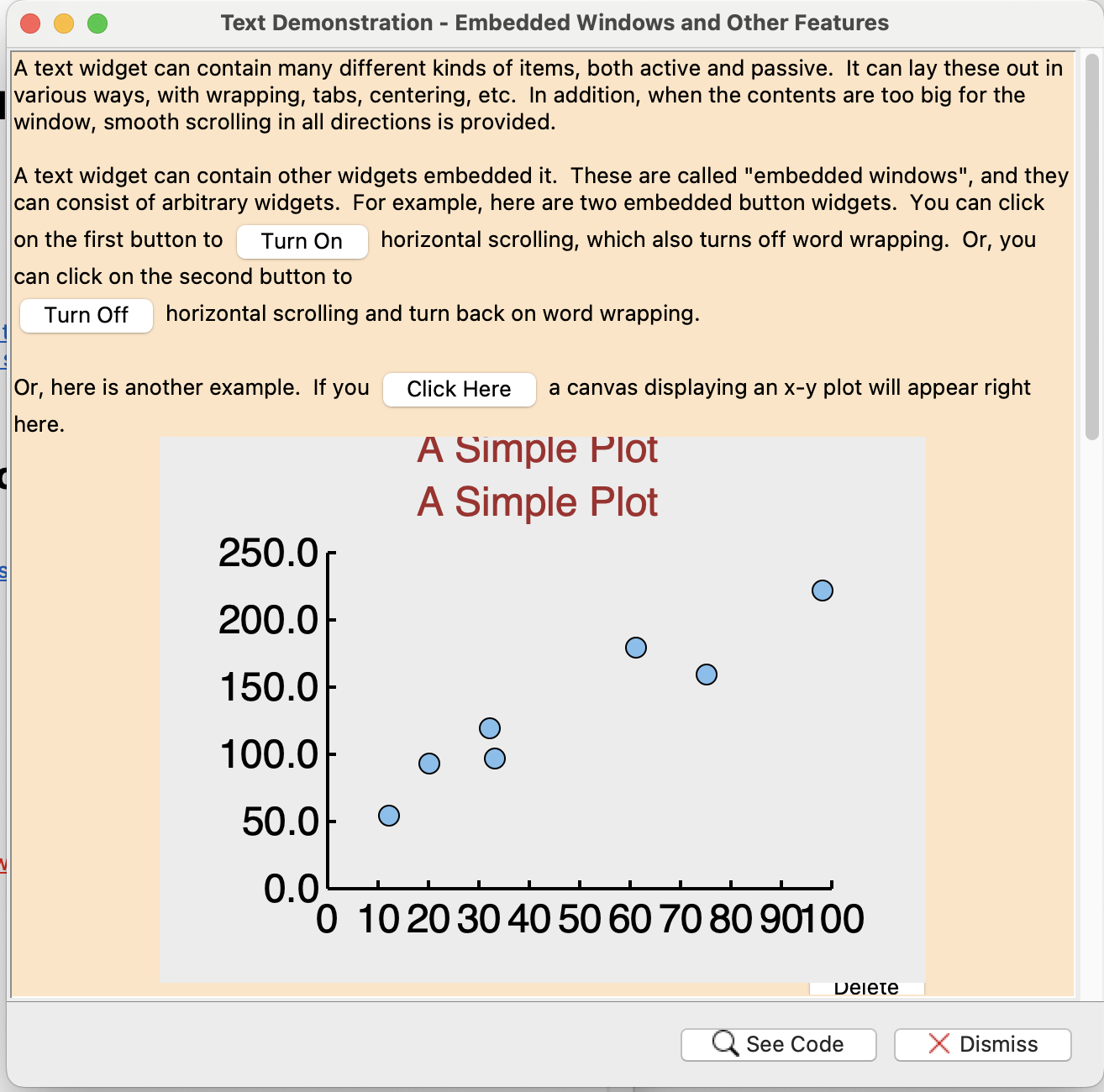
Sure. From some commit page, e.g. [1ad1323e10e0c6a0], look at the fourth line, "Files" and click on "files". From this point you can browse the state of the repository at the state of commit [1ad1323e10e0c6a0]. > In the case of revised_text, I don't know whether we are supposed to work > with the revised_text branch or the fossil repository for the revised text > extension. It seems like we haven't committed to one or the other yet. The rtext extension repository is dedicated to host the extension packaging. There I'm committing changes I take from the revised_text branch of the Tk repository. Functional issues of the revised text widget itself are tracked in the Tk ticket tracker. Only issues specifically related to the TEA packaging of the revised widget should be reported in the rtext ticker tracker. See https://chiselapp.com/user/fvogel/repository/rtext/home marc_culler added on 2025-02-28 20:46:12: Hi François, Yes, it should have the same issue. Does it use the same tkTextDisp.c or does it modify that file? By the way, I have a lot of trouble in fossil trying to view the version of a file in a specific branch. Can you tell me how to do that (I mean on the web, without having to update my working directory to the branch)? In the case of revised_text, I don't know whether we are supposed to work with the revised_text branch or the fossil repository for the revised text extension. It seems like we haven't committed to one or the other yet. Also, there is more to do here. Nicolas found a situation which neither Christopher Chavez nor I had anticpated. The current XScrollWindow does not work correctly if the Text widget is larger than the window containing it. It creates some pretty interesting artifacts as each scroll scales everything in each dimension by the ratio of the size of the Text widget to the size of its visible rectangle in that dimension. In the old days it would be difficult to do such a scroll because the scrollbar is out of view. But now we have touchpad bindings that work anywhere in the Text widget. This is ticket [df4b603950]. fvogel added on 2025-02-28 19:55:25: Hi Marc, What about revised_text? Do we have the same issue or not? Does your fix need to be propagated to the revised_text branch? Thanks! marc_culler (claiming to be Marc Culler) added on 2025-02-28 03:29:42: I think the aqua_text_scroll branch now fixes this problem, as well as the canvas artifacts I was seeing, and also makes the split windows work again in the "A text widget with embedded windows and other features" demo. marc_culler (claiming to be Marc Culler) added on 2025-02-28 03:07:34: Unfortunately, when I fixed the scrolling artifiacts that I reported here for the Text widget I discovered that the changes in the bugfix branch introduce artifacts when displaying a Canvas. (The example is the embedded Canvas in the demo "A text widget with embedded windows and other features". When the Text widget is scrolled, causing redisplay of the Canvas, artifacts sometimes appear along the top of the embedded Canvas. So I think there is more work to do before this Jello is nailed to the wall. marc_culler (claiming to be Marc Culler) added on 2025-02-22 16:20:13: This issue with embedded windows appearing as ghosts in Aqua also arises with the Text widget. One way to produce an example is to run the demo "A text widget with embedded windows and other features". If the embedded plot is open, and the text widget is scrolled quickly, the canvas showing the plot *sometimes* appears twice, with the correct copy rendered on top of a ghost copy but offset by a line or two. I am attaching a screen shot. (It is easier to see this artifact if you use a background color other than white.) The explanation is that when the DLine containing the top of the embedded canvas is displayed, the background fill operation is done using a clipping region that clips out the bounding box of the canvas at its previous location, ie. from the previous scroll operation. This causes part of the old canvas image not to be filled with the background color so the unfilled part appears on the screen as an artifact. Clearly there is no need to be clipping the fill operation at all, since the canvas will be drawn in its correct location after the fill. With the old drawRect drawing one could not count on the drawing operations occurring in that order, since the fill operation might have been delayed due to calling XFillRectangles outside of the drawRect method. That asynchronous behavior was the reason for the elaborate maintenance of clipping regions on macOS. If the clipping were disabled this problem would go away. But disabling the clipping has side effects (mainly blank frames) which occur for reasons that I do not understand yet. marc_culler (claiming to be Marc Culler) added on 2025-02-21 13:46:09: Thanks, Eric. In the meantime Nicolas Bats pointed out that there are similar issues with Tablelist, meaning with a Text widget. So I would really like to make a more global change to correct how clipping regions are handled for macOS, rather tha a somewhat crude patch to the generic canvas code which takes advantage of the fact that macOS is the only platform which defined TK_NO_DOUBLEBUFFER. So I think I need to work on this a bit more before I will be ready to merge it. EricBrunel added on 2025-02-21 07:26:28: Sorry for the delay. I was able to patch the code and rebuild on both macOS 13 and macOS 10.13, and everything seems to work fine now. And as far as I could see, there wasn't any noticeable side-effects. So I'd say the problem is solved. Thanks a lot! marc_culler (claiming to be Marc Culler) added on 2025-02-19 18:18:27: Eric, I have created a bugfix branch bug-61cb40b01b which I think fixes this. It is not an optimal fix - that would involve eliminating the clipping regions altogether - and it does require a bit of redundant drawing. But I think it is what can be done for now since I don't know yet how to eliminate the clipping regions. Can you please test this? I will upload a patch file. marc_culler (claiming to be Marc Culler) added on 2025-02-19 16:16:46: I have been able to diagnose this problem. It is another instance of a problem that has plagued macOS Tk for a very long time - I think from the first days of the Cocoa port. It is described in detail in macOS/README in the section on Clipping Regions. In that description the extra non- working copies of the Text widget are called "ghost windows". I have been able to verify that the clipping regions are not correct for the canvas widget when it is drawn, by just commenting out the line which does the clipping. That makes it work correctly. I think that the very expensive maintenance of these clipping regions should not be needed with the new drawing protocol, since *most* of the time widgets are drawn in stacking order from the bottom up, making clipping unnecessary. Unfortunately there are some execptions to that rule and I have not been able to track down a complete list of the exceptions (but it includes frames, which can get redrawn after their contents have been drawn making the frame blank.) For now I am going to track down why the Canvas is not clipping out the correct rectangles for its window items before it draws the background. (It is clipping the old location of the Text, which is why its ghost appears -- the actual Text gets drawn later in the correct place.) EricBrunel added on 2025-02-19 08:38:51:
Ah, my bad, I should have explained better: I'm actually using both, I have a mac mini with a M1 chip and macOS 13.2, and an antique Intel iMac with macOS 10.13. I'm using these for work: the Intel iMac is usually the build platform to be able to generate binaries that will work everywhere; the mac mini is a test platform. For the moment, we're not sure if we'll go full Apple Silicon from now, or if we'll keep the compatibility with Intel macs, hence the two test builds of tcl/tk 9. marc_culler added on 2025-02-18 20:55:14: > Just for information, I built tcl/tk 9.0.1 from the source code on another > mac with macOS 10.13.6 using the patch described in ticket cb5d776b12 I don't understand. Are you using macOS 13 or macOS 10.13? marc_culler (claiming to be Marc Culler) added on 2025-02-18 16:38:34: Eric, I am able to reproduce this issue on a different Sequoia system (M1 mac mini). So at least I can experiment with this. These are tricky issues, I am afraid. And there is no platform-specific code for the Canvas widget, so this raises the unpleasant issue of how to fix a problem which only arises for one platform in generic code. But I will see what I can figure out. EricBrunel added on 2025-02-18 16:25:13: Hi Marc & Harald, and thanks for having a look at this issue. Just for information, I built tcl/tk 9.0.1 from the source code on another mac with macOS 10.13.6 using the patch described in ticket cb5d776b12 since it doesn't build out of the box. The build was successful, but I see the same problem: with the same script, scrolling the canvas horizontally or vertically does show the "zombie" copies of the text window. oehhar added on 2025-02-18 15:56:50: Thanks for the explanation! So, it is the whole drawing zone, not only a part of it. "Rectangles" is the way, Windows draws- you invalidate a rectangular region to get later on a draw event. Thanks for all, Harald marc_culler (claiming to be Marc Culler) added on 2025-02-18 15:36:15: Hi Harald, The major change was from using drawRect to using updateLayer. The difference is that using updateLayer allows Tk to draw at any time, while using drawRect (after macOS Mojave) only allows drawing to take place within the drawRect method, which is called asynchronously by the Apple window manager. The design of Tk expects that drawing will be possible at any time. That means that when using drawRect many drawing operations would fail and have to be rescheduled for later. But that rescheduling violates many assumptions in the Tk code about the order in which drawing operations will occur. So using updateLayer is much more consistent with the design of Tk. With updateLayer the drawing is done to a CGImage controlled by Tk rather than to a private frame buffer controlled by the Apple window manager and inaccessible to Tk. Perhaps that is what you mean by "shadow buffer". I don't know what you mean by "rectangles". oehhar added on 2025-02-18 14:51:29: Hi Marc, sorry, it is for sure my memory showing gosts, sorry for that. I remember the great rewrite of the Mac-OS in 9.0.0. As I understood, the drawing strategy was changed from rectanlges to a shaddow buffer method. Take care, Harald marc_culler (claiming to be Marc Culler) added on 2025-02-18 14:39:37: I ran this script with the released version of Tk 9.0.1 on on of my computers, which is an M3 macbook Air running macOS 15.3 (Sequoia). I was not able to produce any "zombie" copies of the embedded text widget by scrolling the canvas at any speed. Of course this does not mean that you are not seeing these artifacts. But it certainly complicates debugging. I will try it on some other systems and see if I can reproduce it. marc_culler (claiming to be Marc Culler) added on 2025-02-18 14:22:33: I will look at this Harald. But I don't know what revisions you are referring to. There were no recent changes to the Canvas widget that I know of. oehhar added on 2025-02-18 12:41:02: Hi Eric, thanks for reporting. This part of the code was highly revised. I hope, Marc will care. Harald | |||
Attachments:
- Screenshot 2025-02-21 at 8.48.19 PM.png [download] added by marc_culler on 2025-02-22 16:21:35. [details]
- canvas_ghosts.patch [download] added by marc_culler on 2025-02-19 18:19:26. [details]
- after_v_scroll.png [download] added by EricBrunel on 2025-02-18 10:17:13. [details]
- after_h_scroll.png [download] added by EricBrunel on 2025-02-18 10:16:57. [details]
- before_scroll.png [download] added by EricBrunel on 2025-02-18 10:16:31. [details]