| Ticket UUID: | 3588462 | |||
| Title: | -typevariable ignored in Tk/Cocoa | |||
| Type: | Bug | Version: | None | |
| Submitter: | auriocus | Created on: | 2012-11-19 09:20:49 | |
| Subsystem: | 37. [tk_get*File] | Assigned To: | aku | |
| Priority: | 2 | Severity: | Minor | |
| Status: | Closed | Last Modified: | 2017-05-13 16:37:29 | |
| Resolution: | Accepted | Closed By: | kevin_walzer | |
| Closed on: | 2017-05-13 16:37:29 | |||
| Description: |
Tk/Cocoa does not implement -typevariable. The UI controls for choosing the type are missing, and the typevariable is not touched. Under Carbon it worked. Native Cocoa applications like Pages demonstrate, that the same functionality is possible in Cocoa. See the attached test script and also bug 3588460 | |||
| User Comments: |
kevin_walzer added on 2017-05-13 16:37:29:
Patch by Christian Gollwitzer committed, thanks for the improvements. kevin_walzer added on 2017-05-06 15:39:32: tk_getSaveFile with filtering now works correctly. A minor tweak was all that was required. kevin_walzer added on 2017-05-06 13:02:36: I've found a bit of trouble in the dialog when multiple extensions corresponding to the same file type are included; that causes the button not to load data. Must investigate this further. kevin_walzer added on 2017-05-06 02:31:18: I've committed an update to trunk and core-8-6-branch that implements the file filter for the save dialog, in the same manner as the open file.
Part of my reasoning for sticking with the file extension only is that this is the way it has been implemented since the Cocoa port--apparently Daniel Steffen focused on file extensions only and did not attempt to parse other types, such as file type ("text file, "C file," etc). I'm not sure why this is the case, but I am choosing to stick with that design as it works well enough.
If you want to give this additional filtering a try, you are welcome to do so. -typevariable has not ever been implemented to my knowledge on Cocoa, not sure why.
anonymous added on 2017-05-05 20:13:35: ad 2) "This is a legacy of type and creator codes on Carbon and under the classic macOS"
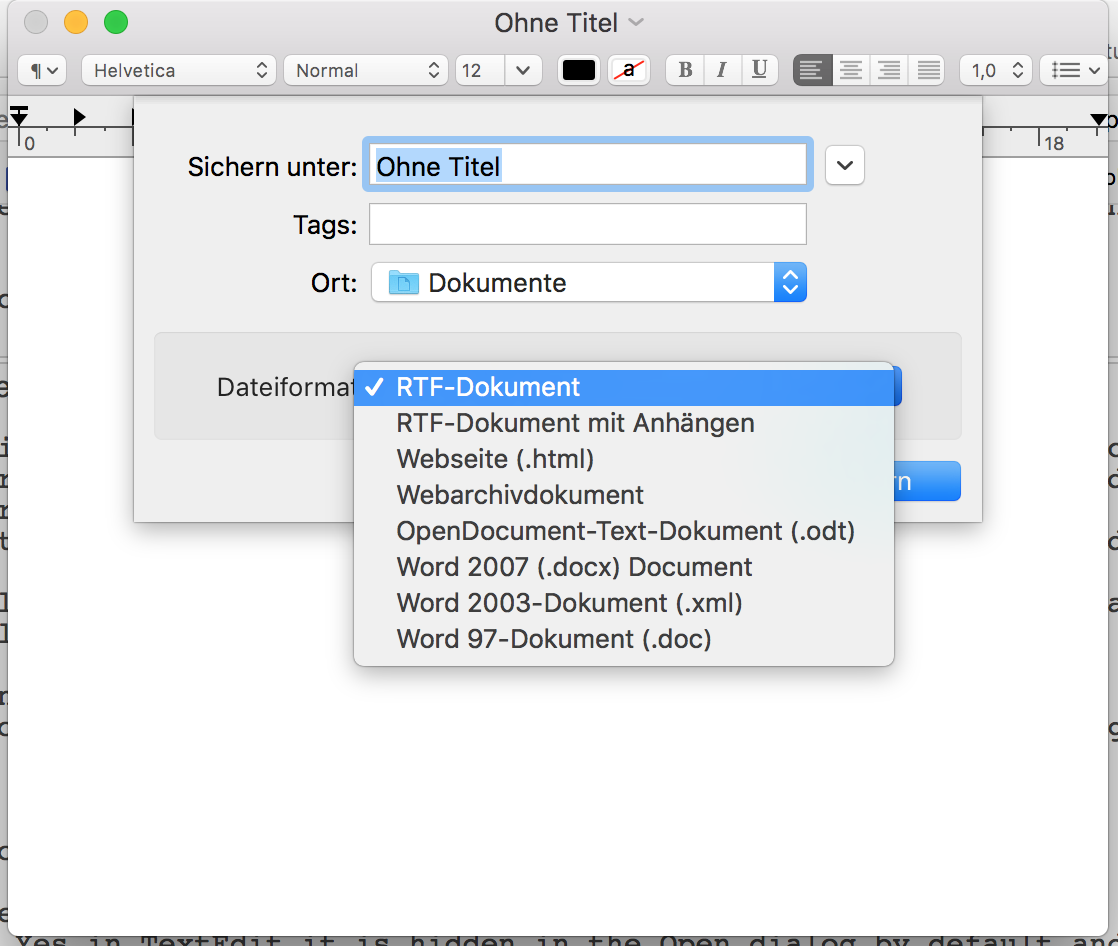
this came across wrong. I was not talking about creator codes which are indeed old stuff which is unused. I was talking about the string that the user sees in the dropdown box. Take the TextEdit example, in the save box you see "RTF document", "RTF document with attachments", "Word document (.docx)" etc. This can be done by
tk_getSaveFile -filetypes {{{RTF document} {.rtf}} {{RTF document with attachements} {.rtf}} {{Word document} {.doc}}}
# etc. for all types
In the current implementation, the dropdown box would display "rtf", "rtf" and "doc" instead, whereas on Linux and Windows it already works, i.e. displays the typename similar to the TextEdit dialog. The expected behaviour and rationale is also discussed in the TIP http://www.tcl.tk/cgi-bin/tct/tip/242.html
Here you can see that the old MAC types are in fact a third element in the list of definitions, obsolete by now, and luckily optional from the beginning.
ad 3) the use case is described in the TIP
ad 4) I see. Yes in TextEdit it is hidden in the Open dialog by default and always visible in the Save dialog (without an Option button)
I can offer to take care of 2) + 3)
kevin_walzer added on 2017-05-05 11:15:59: A few comments: *1) The selection box appears only in the Open dialog. It is also needed in the Save dialog* This functionality has not been supported in the "save" dialog historically on Tk, even in Carbon. Looking at other Cocoa apps that have some version of this in their save dialog, they do not filter file format in the dialog, which is the main use case for this functionality as I understand it. I will do a bit of tinkering and see if this makes sense for Tk. * 2) The entries in the dropdown list display the ending, whereas it should show the label of the file type. * This is a legacy of type and creator codes on Carbon and under the classic macOS, which have long been non-functional on Cocoa. It doesn't make sense to support it now when no other Mac apps do so natively. Cocoa works based on file extensions and that seems to be the best fit here. I do not plan to expand the implementation beyond file extensions. *3) The typevariable doesn't seem to be set on exit:* I didn't address this in the patch. I don't quite understand the use case. If you want to take a try at it, you are welcome to do so. *4) I am not sure it is a good idea to hide away the filter with the options button. * That's how the native dialog is implemented. I used TextEdit as a reference. Some of what you are asking for here involves highly customizing the native dialog to specific use cases; my preference is to keep it simple and limited to the most common use cases, filtering files by extension. anonymous (claiming to be auriocus) added on 2017-05-05 06:28:16: A first implementation is available now - thanks, Kevin. I've tested the patch now, and it is a great start. There are still a few things that need to be changed / implemented.
1) The selection box appears only in the Open dialog. It is also needed in the Save dialog
2) The entries in the dropdown list display the ending, whereas it should show the label of the file type. For instance, try
tk_getOpenFile -filetypes {{{Text} {.txt}} {{Word file} {.doc}}}
On X11, this displays "Text (*.txt)" and "Word file (*.doc)". With the current patch on OSX, it displays "txt" and "doc"
Pages from iWork'09 is a native OSX application which uses such a feature in the save dialog. It displays only the label, i.e. you can select between "Word document" and "iWork '08" which results in ".doc" and ".pages", resepectively. I think that Tk should either follow this style (display the description only) or the Unix style (display description plus glob filter)
Moreover, there can be several supported file types for one document type:
tk_getOpenFile -filetypes {{{Text} {.txt}} {{Word file} {.doc .txt}}}
i.e. supported file names is actually a list of extensions. On X11, this displays "Word file (*.doc, *.txt)" in X11 and allows both files to be selected. In the current patch, this displays only "doc" and allows selection of only .doc files.
3) The typevariable doesn't seem to be set on exit:
tk_getOpenFile -filetypes {{{Text} {.txt}} {{Word file} {.doc}}} -typevariable what
puts [string length $what]
gives 0 for me. what should contain either "Text" or "Word file" depending on the selection. Similarly on opening the dialog, the typevariable should preselect the filter.
4) I am not sure it is a good idea to hide away the filter with the options button. Again, in Pages 09 there is a checkbutton which enables/disables the filter, but it is visible all time. Maybe one could just display these controls all the time if more than one file type is given. If no filetype (or only one, needs to be discussed) is given, then these controls could be hidden. If none is given, currently the Options button opens an empty selection box.
auriocus added on 2012-11-21 00:52:22: I understand that you are busy with other things. I just want to make the point that this functionality is the only sensible way to make an export dialog for an application which supports multiple file formats. The other options include: *Switching on the extension - not obvious to the user *Popping up a second dialog with options - two modal steps *Different menu entries for each format - impractical for more than 2 file formats Maybe I'll try to get my hands dirty on this, however, I've no experience with Cocoa, so no guarantee. wordtech added on 2012-11-20 22:11:57: The Carbon API (NavServices) supported this functionality more or less out of the box: it allowed you to populate a popup menu with file types without adding a lot of extra code. By contrast, as you've noted, Cocoa's dialogs offer no such built-in support and require accessory views. I suspect this significant extra complexity is why das did not include such support in Tk-Cocoa. The sample code you pointed me to is not reassuring in terms of its complexity: that's a *lot* of code to add for a single variable flag. Given my limited time, and given that this is extremely non-trivial to implement, I can't make any commitment as to if or when it will be added. If you want to provide a patch, that would be a huge help. auriocus added on 2012-11-20 14:31:14: The functionality is explained in TIP242, termed as "Done" for 8.5:
http://www.tcl.tk/cgi-bin/tct/tip/242
You are right, it's also not working under Carbon. But the open panel has it under Carbon. Try:
tk_getOpenFile -typevariable seltype -filetypes {{ASCII *.txt} {Unicode *.txt}}
The use case described there is for example a save dialog which allows to select between different output formats. If you do
tk_getSaveFile -typevariable seltype -filetypes {{ASCII *.txt} {Unicode *.txt}}
on X11 or Windows, after it returns, you can switch on the varable "seltype" which is supposed to contain "ASCII" or "Unicode", according to the user's selection - just like it is possible with Pages. To see the expected behaviour, open the save panel for Pages and switch between "Word" and "iWork" - it also changes the extension from .doc to .pages.
I have browsed through the docs of Apple, it seems there is no simple method to NSSavePanel to achieve this; instead, on has to use the acessory view to insert additional widgets. This question was also asked few times in forums. See e.g.
http://stackoverflow.com/questions/10533517/with-nssavepanel-how-can-the-user-choose-a-specific-file-type-to-save
and the "Custom Save" example
https://developer.apple.com/library/mac/#samplecode/CustomSave/Introduction/Intro.html
wordtech added on 2012-11-20 07:48:15: Also, after testing the attached sample script on Lion with both Tk-Cocoa (8.5.13) and Carbon (8.5.3), I do not see the UI component highlighted in the save dialog, and I get this error after closing the dialog: can't read "seltype": no such variable. I'm a bit lost as to what you are trying to achieve here. wordtech added on 2012-11-20 07:36:37: tkMacOSXDialog.c includes this comment around line 496: "The -typevariable option is not really supported." I don't see a class method in NSSavePanel that returns the type of file selected; the closest thing I can find is [URL], which returns a file URL pointer. That doesn't sound like what you are looking for. I'm not quite clear on the use case for the -typevariable flag: when is such a thing used? auriocus added on 2012-11-19 16:40:19: The API for extension of file dialogs is described here: https://developer.apple.com/library/mac/documentation/Cocoa/Reference/ApplicationKit/Classes/NSSavePanel_Class/Reference/Reference.html#//apple_ref/occ/instm/NSSavePanel/setAccessoryView: auriocus added on 2012-11-19 16:32:22: File Added - 456740: pages_typevariable.png auriocus added on 2012-11-19 16:20:53: File Added - 456737: ftypebug.tcl | |||
Attachments:
- Bildschirmfoto 2017-05-05 um 22.14.16.png [download] added by anonymous on 2017-05-05 20:15:16. [details]
- pages_typevariable.png [download] added by auriocus on 2012-11-19 16:32:22. [details]
- ftypebug.tcl [download] added by auriocus on 2012-11-19 16:20:53. [details]