| Ticket UUID: | 3406785 | |||
| Title: | Incorrect coords rounding --- pixel jump in drawing items | |||
| Type: | Bug | Version: | obsolete: 8.6b2 | |
| Submitter: | ladayaroslav | Created on: | 2011-09-09 13:48:09 | |
| Subsystem: | 04. Canvas Basics | Assigned To: | fvogel | |
| Priority: | 5 Medium | Severity: | Minor | |
| Status: | Closed | Last Modified: | 2017-09-16 08:28:21 | |
| Resolution: | Fixed | Closed By: | fvogel | |
| Closed on: | 2017-09-16 08:28:21 | |||
| Description: |
Look at result of this script:
-----
canvas .c -bg white
grid .c
set x1 20
set x2 22
set y2 105
for {set f 0} {$f<50} {incr f} {
    set y1 [expr {$y2-0.05*$f}]
    .c create rectangle $x1 $y1 $x2 $y2 -fill black
    incr x1 2
    incr x2 2
    }
-----

On Windows XP I see that at left side of figure bottom margin is one pixel lower than at right side. But it shouldn't happen as y2 is the same
(105) for all rectangles. Also, DKF confirmed the bug on OSX, and with both 8.5 and 8.6.
| |||
| User Comments: |
fvogel added on 2017-09-16 08:28:21:
Merged in core-8-6-branch and trunk.

Thanks again to ysch for helpful discussion and proposal.
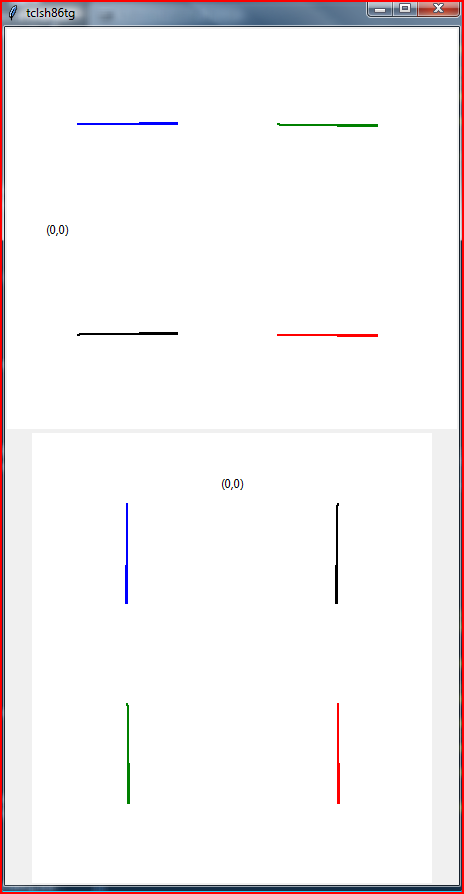
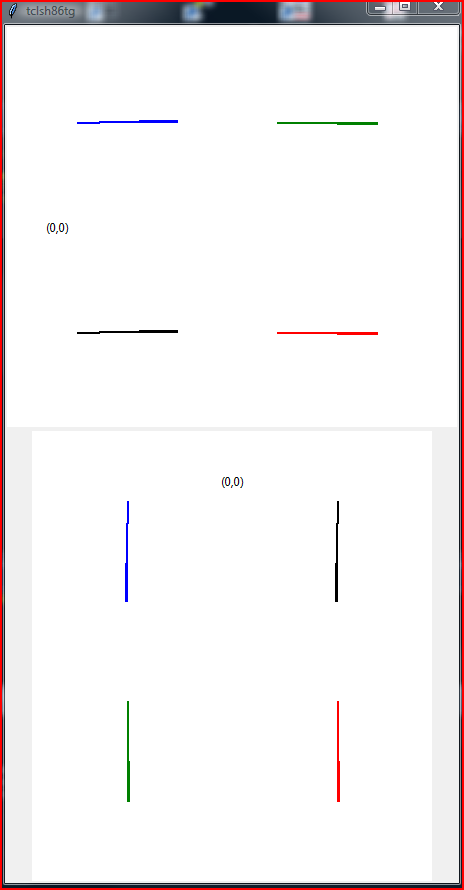
fvogel added on 2017-09-09 14:00:48: Following discussion in the chat with the OP (ysch) on the basis of the demo script he provided, a solution surfaced that I have committed in branch bug-3406785. I'm attaching snapshots of the rendering produced before and after the fix. The test script producing these snapshots was created from the original demo script when this ticket was reported, and I'm attaching it as well. The problem is now fixed in all cases except when the height or width of the item bounding box is exactly zero (totally flat canvas item). In this last case an arbitrary choice of the pixel to draw is made, which may or may not look "aligned" with other items in the canvas. Since we want to draw even zero height/width items (and represent them with 1 pixel height/width), we are left with this arbitrary choice. fvogel added on 2017-08-23 14:59:46: Thank you for your clear report and for both scripts. I have digged a bit into the source code. Because of the behaviour of some X servers, and also because (on Windows at least) nothing is drawn on screen at all when a rectangle has zero width or height, Tk always increases the size of very small rectangles and draws them as if they were at least one pixel wide and tall. Then, when the coordinates given by the user are so close to each other that the resulting width or height of the rectangle would be zero, an arbitrary choice has been made in Tk to increase by 1 the coordinate of the lower and/or right border. This is why the leftmost rectangles of your test script are actually drawn one pixel below the pixel line corresponding to y-coordinate 105. For instance consider:
.c create rectangle 20 104.8 22 105
In this case coordinates y1 and y2 returned by Tk_CanvasDrawableCoords() are identical, because the screen space corresponding to the screen span between 104.8 and 105 is less than half a pixel. The height of the rectangle would then be zero, which shall not happen for the reasons stated above. And y2 is arbitrarily chosen to get the increase by 1 avoiding zero height. All this does not happen when the coordinates given span more than half a pixel on screen (no artificial width/height increase happens), e.g. with:
.c create rectangle 20 104.4 22 105
Now, how can this be fixed? Decreasing y1 by 1 instead of increasing y2 by 1 would fix the test case you provided, but then it would be easy to show that the top-down mirrored test (using Removal of the artificial increase alltogether is not an acceptable option either I think, because such small rectangles would completely disappear from the screen. I think we can only tag this ticket as Invalid. ladayaroslav added on 2011-09-09 21:52:29: Also, here is the model to demonstrate Tk's behaviour. Green rectangles are actual coords provided, colored rectangles show how Tk draws them:
-----
canvas .c -bg white -highlightthickness 0
grid .c
for {set f 0} {$f<500} {incr f 20} {
.c create line $f 0 $f 2000 -width 0 -fill grey
.c create line 0 $f 2000 $f -width 0 -fill grey
}
set x1 20
set x2 40
set y2 200
for {set f 1} {$f<20} {incr f} {
set y1 [expr {$y2-5*$f}]
if {($y2-$y1)<20} {
set a [.c create rectangle $x1 $y2 $x2 [expr {$y2+20}] -fill red -width 0]
} else {
set a [.c create rectangle $x1 [expr {round($y1/20.0)*20}] $x2 $y2 -fill lightblue -width 0]
}
.c lower $a
.c create rectangle $x1 $y1 $x2 $y2 -outline darkgreen
incr x1 20
incr x2 20
}
-----
| |||
Attachments:
- After_fix.png [download] added by fvogel on 2017-09-09 14:03:21. [details]
- Before_fix.png [download] added by fvogel on 2017-09-09 14:03:02. [details]
- ScriptUsedForFixChecking.tcl [download] added by fvogel on 2017-09-09 14:02:42. [details]
- BetterDemoScript.tcl [download] added by fvogel on 2017-09-09 13:48:36. [details]