| Ticket UUID: | 309b4261710e99d4c23bbbdd0e9c8e573d071858 | |||||||||||||||||||||||||||||||||||||||||||||||||||||||||||||||||||
| Title: | ttk partly fails in Windows high-contrast-mode using wrong colors | |||||||||||||||||||||||||||||||||||||||||||||||||||||||||||||||||||
| Type: | Bug | Version: | 8.6.4 | |||||||||||||||||||||||||||||||||||||||||||||||||||||||||||||||||
| Submitter: | Martin0815 | Created on: | 2016-12-12 16:01:55 | |||||||||||||||||||||||||||||||||||||||||||||||||||||||||||||||||
| Subsystem: | 88. Themed Tk | Assigned To: | fvogel | |||||||||||||||||||||||||||||||||||||||||||||||||||||||||||||||||
| Priority: | 5 Medium | Severity: | Severe | |||||||||||||||||||||||||||||||||||||||||||||||||||||||||||||||||
| Status: | Closed | Last Modified: | 2018-07-04 08:47:02 | |||||||||||||||||||||||||||||||||||||||||||||||||||||||||||||||||
| Resolution: | Fixed | Closed By: | fvogel | |||||||||||||||||||||||||||||||||||||||||||||||||||||||||||||||||
| Closed on: | 2018-07-04 08:47:02 | |||||||||||||||||||||||||||||||||||||||||||||||||||||||||||||||||||
| Description: |
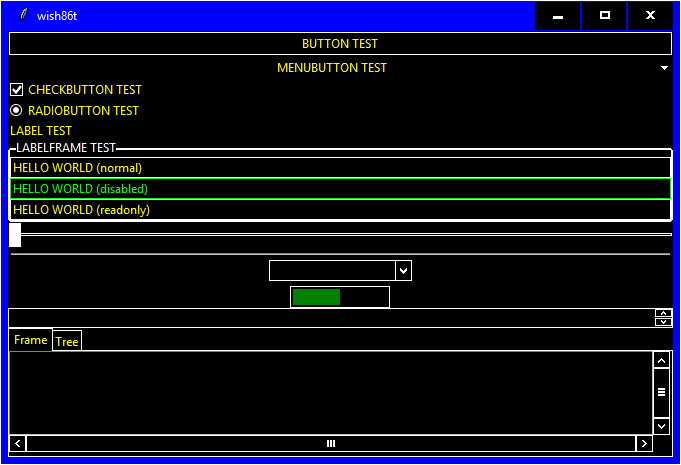
Enabling the so called high-contrast-mode on Windows using the theme high-contrast-#1 (default), switches the window background to black, the window text to yellow and window frames to white, etc. Using normal Tk widgets does not cause any problems with this accessibility support mode for eye disabilities. But using Ttk causes problems with specific widgets: - ttk::entry (1) - ttk::combobox (2) - ttk::spinbox (3) - ttk::treeview (4) All of those widgets render using the wrong background color not using the system window background color, which is mandatory with enabled high-contrast-mode. Additionally the entry-like widgets use the wrong colors related to their state, so that the normal state uses a white background and the readonly state looks like entry should look in normal state. The treeview widget only has the problem to be not completely filled with the system window background color. I attached the a screenshot of the result of the attached script. The screenshot contains some red enclosed areas with numbers, corresponding to the numbers in the widgets list (1 .. 4) Why this ticket is "severe"? The bugs in Ttk prevent the usage of a Ttk UI in high-contrast-mode, which is used by people with eye disabilities! So it is not about cosmetics or being important, but about to guarantee the functionality at all! | |||||||||||||||||||||||||||||||||||||||||||||||||||||||||||||||||||
| User Comments: |
fvogel added on 2018-07-04 08:47:02:
Merged to core-8-6-branch and trunk.

Many thanks to all the participants!
fvogel added on 2018-07-03 21:51:07: Yes, I was running the tip of the bugfix branch bug-309b426171, that is I was using checkout [0f4e1517b6]. That definitely is what 'fossil status' states, at least. However, double checking proves that I must have been running something slightly different, because the fix appeared to be present (i.e. there was no remaining problem when running the app while the high contrast mode was already switched in), whereas when running the app and then switching to high contrast I saw a different situation than what can be explained by the fact the Tk widget do not follow system color or theme changes. I have no explanation to this, I can only observe that cleaning everything and compiling and installing again the bugfix branch showed no remaining unexplained issue: - The behavior is 100% OK when running the app whilst the OS already is in high contrast theme - The behavior is 100% OK for the ttk widgets when switching to high contrast theme whilst the app is already running, and is incorrect for Tk widgets (as expected - subject of a further ticket) In short: cjmcdonald you're fully right and I must have messed up my branch setting or version (though I'd pay a lot to understand how that happened...!) I'll be merging soon, many thanks to all! bll added on 2018-07-03 21:48:12: Retesting with the bug fix: Both win7 and win8.1 look the same. The separator and the notebook/frame do not reconfigure their colors automatically as cjmcdonald has noted. And of course the popdown listbox does not. A restart and their colors are correct. cjmcdonald added on 2018-07-03 21:10:44: Ok, I'm a bit puzzled now that you still see a problem with ttk widgets, such as the ttk:entry, combobox and spinbox. Because that is what the patch in branch bug-309b426171 was supposed to fix. Are you definitely running that bugfix branch? I don't see problems with the ttk widgets anymore. Only with the non ttk widgets, as discussed. bll added on 2018-07-03 20:54:47: Looks like I am all wrong. ttk::combobox and ttk::spinbox are using ttk::entry. If you can fix ttk::entry, they should all get fixed. The only non-ttk element is the popdown listbox. fvogel added on 2018-07-03 20:20:44: > ttk::combobox and ttk::spinbox are using an 'entry' widget internally. Can you point me to an evidence of this? > I don't know if ttk::entry also uses an 'entry' widget internally. I'd say no, since a disabled or readonly ttk::entry follows theme changes but a normal one doesn't. The same widget must be used for all three states, isn't it? bll added on 2018-07-03 19:26:52: ttk::combobox and ttk::spinbox are using an 'entry' widget internally. No surprise that they do not track the colors. I don't know if ttk::entry also uses an 'entry' widget internally. fvogel added on 2018-07-03 19:06:10: Actually what you write all makes a lot of sense for Tk widgets. The problem I see is that there are not only the two areas you mentioned that are not tracking system color changes, but also: - The first entry widget packed inside the labelframe, that is .lf.e (the "normal" state entry) is a ttk entry, nevertheless the background of this entry is still white after switching in high contrast mode whilst the app is running. Note that the other two entries (the disabled one and the readonly one) that are packed in this same labelframe are rendering OK. - The combobox .pw.f1.cbx also has the same problem. It also is a ttk widget, therefore should track colors/theme changes. - Ditto for the .sb spinbox. It's a ttk::spinbox but is not tracking the changes. cjmcdonald added on 2018-07-03 14:02:23: There are two areas of artifacts seen with the test script, when changing themes whilst it is running. They are both due to the nature of the commands in the test script. The first area of artifact is around a ttk::separator widget ".s", just above the combobox. That appears simply because there is some padding added around the ttk::separator, in this line: pack configure .s -padx 3 -pady 5 The padding allows the underlying toplevel widget "." to show through. toplevel widgets are not Ttk themed widgets, and don't track system changes whilst running. To fix the test script either remove the padding around .s, or add a themed background which covers the whole toplevel, eg: ttk::frame .background place .background -relwidth 1 -relheight 1 lower .background at the end of the script will work. Similarily, the artifact seen on the Frame page of the notebook widget is actually a Tk text widget ".nb.f.t". The text widget has a default -background value of SystemWindow, which picks up the correct system colour when wish starts, but like all of the non-themed widgets doesn't track changes in the system colours whilst running. To make the non-themed Tk widgets track changes in the system colours, in the same way as the Ttk widgets, would be a bigger job, and should probably be a separate ticket. The non-themed widgets use the routines in generic/tkColor.c & win/tkWinColor.c, which cache colour values in a per-display hash table, and they don't change for the life of the process. bll added on 2018-07-03 06:44:34: My mind was on the color change. If you go into windows personalization and change the window background color, Tk does not re-paint and still has the old color. Probably the subject for a different ticket. (I am using re-paint as a general action, not a windows specific message). Of course it could be the same symptom of the same problem. fvogel added on 2018-07-03 06:29:50: I doubt the lack of a WM_PAINT message to be the cause.
Start in normal contrast mode, then run the example appplication the OP provided ("ttk-high-contrast-#1-test.tcl"). Now, while the app is running, switch to high contrast mode (using Left Shift + Left Alt + PrtScr key combination for instance) and observe how the Tcl/Tk window really IS repainted, except in some background areas. These areas are exactly those that the OP mentioned in his original report.
bll added on 2018-07-02 23:02:27: RegisterSystemColors() is updating the colors, but I don't see any call to re-paint the Tk windows. fvogel added on 2018-07-02 20:16:44: Both WM_SYSCOLORCHANGE and WM_THEMECHANGED are already processed by Ttk. I had first thought that SystemWindowText, SystemWindow, or SystemButtonText was missing from the sysColors[] table used in RegisterSystemColors(), but this is not the case. Something else must be missing, this needs further debugging. Martin0815 added on 2018-07-02 15:01:17: Thanks to you all testing the changes! I was not able to test it in time. @Harald: The message we use in our C++ application is WM_SYSCOLORCHANGE. If the user or something else changes the system colors, retrievable e.g. with "::GetSysColor", than WM_SYSCOLORCHANGE is sent! If the high-contrast-mode gets switched on/off the message WM_THEMECHANGED is sent to, since the theme gets changed to the last used high-contrast-theme. oehhar added on 2018-07-02 07:10:08: > About your test result "bug-309b426171_win10_design_change_while_running.png", we seem to be lacking processing of some message sent by the Windows OS. Can you tell which message this is (using spy++?) ? I use SpyEx (Spy++ does not work any more, don't know why).
The resulting messages are:
I don't know why, but I was not able to Spk Tk. fvogel added on 2018-06-29 18:39:59: Thanks for your testing. So the fix works and can be merged, great! About your test result "bug-309b426171_win10_design_change_while_running.png", we seem to be lacking processing of some message sent by the Windows OS. Can you tell which message this is (using spy++?) ? oehhar added on 2018-06-29 11:38:11: Win 10 here. Tried with: * 8.5.19 * 8.6.7 * 8.6.8 * given branch with tcl 8.6.8 In any case, the test script result looks the same and the visual effects described by Martin where never observed. This is "High contrast #1". I only saw artefacts, when I changed to high contrast mode, when the application was already running. Attached:
bll added on 2018-06-29 02:05:14: Tested on windows 8.1. ttk::style theme use reports 'vista' while in high-contrast mode. Looks ok. fvogel added on 2018-06-28 06:17:21: Can anyone confirm that the fix is OK on Win10 please? Please try the fix in branch bug-309b426171 This is the last thing I'd like to be checked before merging. If nobody steps in I'll consider it works and merge. fvogel added on 2018-06-16 07:59:06: Added test results for Win 7, one snapshot beofre the fix, and another snapshot with that fix [0f4e1517]. Looks OK to me. Please confirm this is OK with you Martin. Win10 : can't check, I have no access to this OS. fvogel added on 2018-06-11 17:19:37: Many thanks for your clear and deep analysis. This all makes a lot of sense and is very helpful. I have committed your files in a bugfix branch for easy review and testing. May I ask the OP (Martin) to check that his problems are now fully fixed? cjmcdonald added on 2018-06-11 10:13:35: In Windows 7, the high contrast themes are implemented as windows classic themes (what we call "winnative" in ttk themes). In Windows 8 and later that is no longer the case, and the high-contrast themes are all visual styled themes (what we call "vista" in ttk themes). This is somewhat explained in: https://msdn.microsoft.com/en-us/library/windows/desktop/hh404233(v=vs.85).aspx and other pages in MSDN. We can see this effect running wish on a Windows 7 system with a aero theme. Enter "ttk::style theme use" and the ttk theme returned is "vista". But change the system to use a high contrast theme and wish changes to the "winnative" ttk theme. Not so under Windows 10, the ttk theme is still "vista" even when Windows is set to a high contrast theme. This explains the difference in the behaviours which the OP was seeing from his original post of 2016-12-12 16:01:55 on Windows 7, and his subsequent post of 2016-12-22 16:49:25 on Windows 10. The original Windows 7 problem was that entry-like widgets are using the wrong colours for high contrast. So, from the info above, this must be a problem with the ttk "winnative" theme. The winnative entry widgets use a "field" element, and looking in Tk 8.6.8 win/ttkWinTheme.c we can see that the field element has a hardcoded background of white. I can't think why that should be, especially as the non-themed Tk entry widgets correctly use the SystemWindow colour for background. Setting the fieldbackground option to SystemWindow in library/ttk/winTheme.tcl fixes this - it then follows the Windows high contrast settings as required. Once that is fixed, another problem becomes apparent. The flashing insert cursor is hardcoded to black, so it can't be seen against black entry backgrounds for windows high contrast colours. Setting the insertcolor option to SystemWindowText fixes this, so that the insert colour follows the text colour, and can be seen against the entry background. This has to be done for all of the ttk windows themes, "winnative", "xpnative" and "vista". Then on 2016-12-22 16:49:25 the OP reported on Windows 10 high contrast. This was better, which is good as it shows that the ttk "vista" theme used there is generally doing the right thing. But the labelframe text colour is hardcoded to blue. This is a hangover from the "xpnative" theme which attempted to emulate the colour of the default Windows-XP appearance. It's no use on later systems, and doesn't follow the system colours. Setting the TLabelframe.Label element foreground option to SystemButtonText in the "vista" theme fixes this. Attached are updated versions of the winTheme.tcl, xpTheme.tcl and vistaTheme.tcl files from the library/ttk directory in the Tk 8.6.8 distribution, containing these fixes bll added on 2017-04-12 21:00:57: vistaTheme.tcl is using the theming calls in win/ttkWinXPTheme.c . bll added on 2017-04-12 20:41:45: Many of the widgets in question are leveraging the older 'entry' widget, etc., so the colors need to be changed for those widgets as appropriate. This will require fetching the colors from the current theme and applying them. References: Using Visual Styles with Custom and Owner-Drawn Controls https://msdn.microsoft.com/en-us/library/windows/desktop/dd373487(v=vs.85).aspx If this is implemented, I believe(?) that it would also resolve a lot of windows theming look and feel issues. Supporting High Contrast Themes https://msdn.microsoft.com/en-us/library/windows/desktop/hh404233(v=vs.85).aspx win/ttkWinXPTheme.c seems to include theming support, but apparently that was not carried over into library/ttk/vistaTheme.tcl . Martin0815 added on 2016-12-23 00:47:09: Sorry for not providing all needed information at the first time. At work I use a windows 7 SP1 enterprise edition, but at home windows 10 professional. Both behave in details very different in rendering with enabled high-contrast-mode. fvogel added on 2016-12-22 19:22:01: Sorry but I'm lost. Your original report says you have issues with ttk widget in "high-contrast-mode on Windows using the theme high-contrast-#1". And the "version" field of the present ticket shows 8.6.4. entry, combobox, spinbox and treeview are said to have issues. Your latest comment states you have different issues with ttk widgets "of tcl/Tk 8.6.4 on Windows 10 with high-contrast-#1 theme/design and it behaves different". And "Now the entry, combobox, spinbox and treeview look fine". What's the difference? the "10" of "Windows 10"? What was the windows version for your original report? Martin0815 added on 2016-12-22 16:49:25: I tested now using ttk of tcl/Tk 8.6.4 on Windows 10 with high-contrast-#1 theme/design and it behaves different, but even not completely correct. Now the entry, combobox, spinbox and treeview look fine, while the treeview does not show the lines between the nodes. But the labelframe has a blue label, instead of a white or even yellow colored one. Since the behavior is different on different Windows versions, I can't use ttk widgets - not all ttk widgets. Martin0815 (claiming to be Martin Lemburg) added on 2016-12-12 16:08:49: Forgot to describe, why the ticket is "severe". | |||||||||||||||||||||||||||||||||||||||||||||||||||||||||||||||||||
Attachments:
- bug-309b426171_win10_design_change_while_running.png [download] added by oehhar on 2018-06-29 11:39:23. [details]
- bug-309b426171_win10.png [download] added by oehhar on 2018-06-29 11:38:54. [details]
- Win7_After_the_fix_0f4e1517.png [download] added by fvogel on 2018-06-16 07:57:38. [details]
- Win7_Before _the_fix_0f4e1517.png [download] added by fvogel on 2018-06-16 07:57:16. [details]
- vistaTheme.tcl [download] added by cjmcdonald on 2018-06-11 10:12:26. [details]
- xpTheme.tcl [download] added by cjmcdonald on 2018-06-11 10:12:07. [details]
- winTheme.tcl [download] added by cjmcdonald on 2018-06-11 10:11:35. [details]
- 2016-12-12_16-47-54_wish.png [download] added by Martin0815 on 2016-12-12 16:05:59. [details]
- ttk-high-contrast-#1-test.tcl [download] added by Martin0815 on 2016-12-12 16:04:19. [details]