| Ticket UUID: | 2433781 | |||
| Title: | button not centering image | |||
| Type: | Bug | Version: | obsolete: 8.5.5 | |
| Submitter: | gcramer | Created on: | 2008-12-16 16:14:51 | |
| Subsystem: | 03. [*button] and [label] | Assigned To: | gcramer | |
| Priority: | 5 Medium | Severity: | Minor | |
| Status: | Closed | Last Modified: | 2017-05-19 19:52:29 | |
| Resolution: | Fixed | Closed By: | fvogel | |
| Closed on: | 2017-05-19 19:52:29 | |||
| Description: |
Try the following code:

image create photo img -data { R0lGODdhCgAKAIABAMEsLP///ywAAAAACgAKAAACCISPqcvtD2MrADs= }
button .b -borderwidth 1 -image img -relief solid
pack .b

As you can see, the image will not be centered. This makes it impossible to use button as a toolbar button.

One possible solution: allow 2 values for -ipadx and -ipady; like -padx and -pady.
| |||
| User Comments: |
gcramer added on 2017-05-01 14:24:53:
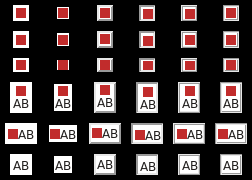
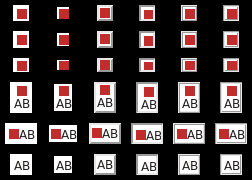
It's obvious that function TkpDisplayButton() [tkUnixButton.c] has an offset problem. I've commited a bugfix [485e744f], because I've detected that the case if the padding is even was not considered, and the bugfix is considering this case. For testing I've used this script:
image create photo img -data { R0lGODdhCgAKAIABAMEsLP///ywAAAAACgAKAAACCISPqcvtD2MrADs= }

. configure -bg black

for {set i 1} {$i <= 6} {incr i} {
   set relief [lindex {flat solid raised sunken ridge groove} [expr {$i - 1}]]
   button .b$i -bd 2 -image img -height 10 -relief $relief -bg white
   button .c$i -bd 2 -image img -height 11 -relief $relief -bg white
   button .d$i -bd 2 -image img -height 8 -relief $relief -bg white
   button .e$i -bd 2 -image img -relief $relief -bg white -padx 0 -pady 0 -compound top -text "AB"
   button .f$i -bd 2 -image img -relief $relief -bg white -padx 0 -pady 0 -compound left -text "AB"
   button .g$i -bd 2 -relief $relief -bg white -padx 0 -pady 0 -text "AB"
   grid configure .b$i -row 0 -column $i -padx 5 -pady 5
   grid configure .c$i -row 1 -column $i -padx 5 -pady 5
   grid configure .d$i -row 2 -column $i -padx 5 -pady 5
   grid configure .e$i -row 3 -column $i -padx 5 -pady 5
   grid configure .f$i -row 4 -column $i -padx 5 -pady 5
   grid configure .g$i -row 5 -column $i -padx 5 -pady 5
}
I've attached two images: "old-layout.png" show the erroneous result, and "new-layout.png" shows the fixed result. gcramer added on 2009-05-20 23:39:57: I see two 2 px left and above, but 0 px right and below the red rectangle. I agree with dkf that this only occurs with X11. dkf added on 2009-05-11 04:42:05: Problem only occurs with X11-based rendering, and appears to be an off-by-one bug. hobbs added on 2009-05-09 02:03:33: In what way is the image not centered? On Windows I see a read square perfectly surrounded by 1px all around, then the solid outline. When selecting, it shifts down, as is the designed behavior of button images on selection. gcramer added on 2008-12-16 23:42:14: Oops, forget the solution. I confused this with the pack command. Another solution is neccessary. | |||
Attachments:
- toolbar-sunken-old.png [download] added by gcramer on 2017-05-01 15:44:34. [details]
- toolbar-sunken-new.png [download] added by gcramer on 2017-05-01 15:44:19. [details]
- toolbar-hovered-old.png [download] added by gcramer on 2017-05-01 15:43:57. [details]
- toolbar-hovered-new.png [download] added by gcramer on 2017-05-01 15:43:34. [details]
- new-layout.png [download] added by gcramer on 2017-05-01 14:26:00. [details]
- old-layout.png [download] added by gcramer on 2017-05-01 14:25:42. [details]