| Ticket UUID: | 0aba7b69c4c34f871e69ba9d84b248608a84fab7 | |||
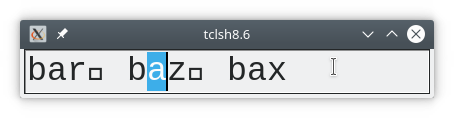
| Title: | Selection incorrectly displayed in entry widgets containing newlines | |||
| Type: | Bug | Version: | core-8-6-branch | |
| Submitter: | fvogel | Created on: | 2021-01-01 21:34:43 | |
| Subsystem: | 47. Win Fonts | Assigned To: | nobody | |
| Priority: | 5 Medium | Severity: | Minor | |
| Status: | Pending | Last Modified: | 2026-10-26 18:14:46 | |
| Resolution: | Fixed | Closed By: | nobody | |
| Closed on: | ||||
| Description: |
On Windows but not on Linux, when an entry widget's string contains newline characters, selecting characters in this entry shows incorrect behavior. Example script:
package require Tk
pack [entry .e -font {Courier 25}]
.e insert end "bar\n baz\n bax"
focus -force .e ; .e selection range 6 7
| |||
| User Comments: |
oehhar added on 2026-10-26 18:14:46:
For me, it would be great to backport the fix to 9.0, but only if no big changes required. It is an annoying point. THanks, Harald serhiy.storchaka added on 2026-09-25 09:16:01:
Fixed in 9.1 by the new text drawing on Windows: the newline is measured and drawn with the same (zero) width, so the text, the selection and the cursor line up (checked on Windows 11). 8.6.18 and 9.0 still show the problem; there the fix would be to measure only what oehhar added on 2021-01-03 19:10:43: Francois, thank you looking into this. Yes, display and character position is different including selection and caret positionning. I have no additional comments or thoughts. On Linux, a replacement character is displayed. On Windows, nothing is displayed. Thank you, Harald fvogel added on 2021-01-03 10:22:24: Thanks for your feedback. In my comment below I was considering the measured width to be wrong, but you're right one can (and should perhaps rather?) consider the displayed output text as being wrong since it silently does not newlines and other characters, contrary to Linux, and is inconsistent with the width that the same Windows API did measure: when the string contains newlines, TextOutW() does not show them in the displayed output but GetTextExtentPoint32W() includes non-zero newlines width in its measurement of that same string. And the issue is not limited to selecting text:
  package require Tk
  pack [entry .e -font {Courier 25} -insertofftime 0]
  .e insert end "bar\n baz\n bax"
  focus -force .e ; .e icursor end ; # cursor is shown past the last character!
In the above example, the cursor position can be considered right, but the displayed text is inconsistent with this last position since the newlines are removed when displaying the string, making it shorter on the screen.
I have looked at the man page for TextOutW() but haven't found how to make it display newlines (or other chars) like Linux does. I have also made experiments with DrawText() as a possible replacement but could only get the same result, it just behaves the same way. There is an interesting note in the man page for Tk_MeasureChars(): "A glyph is the displayable picture of a letter, number, or some other symbol. Not all character codes in a given font have a glyph. Characters such as tabs, newlines/returns, and control characters that have no glyph are measured and displayed by these procedures in a platform-dependent manner; under X, they are replaced with backslashed escape sequences, while under Windows and Macintosh hollow or solid boxes may be substituted.". Note the "may". This would depend on the font used I think, but nevertheless the string width measurement should be consistent with that display in my opinion. Finally, comments in the source code for Tk_DrawChars() tell a different story (and the inconsistency with the string width measurement is not mentioned). oehhar added on 2021-01-02 18:06:11: Thank you for looking into this. May I add, that similar issues appear, if the entry widget contains ASCII control characters:
package require Tk
pack [entry .e -font {Courier 25}]
.e insert end "bar\u001d baz\u001d bax"
focus -force .e ; .e selection range 6 7
The special characters are somewhat filtered on the output, but count as characters when cursor and selection is calculated. I don't see that as very critical. As I often have strings with ASCII-control characters (EOT, GS, RS, US) I am used to that. The characters are handled correctly. You can input them with "Press and hold ALT, press on numeric pad: 0 2 9. release ALT key" (for \u001d = Dec 29 = GS). In my case, they are normally input by a barcode scanner and the barcode scanner emulates a keyboard and presses virtually the upper sequence. ---- Proposition follows to display control characters by Unicode Control Pictures IMHO a good solution would be to display control characters by the unicode control pictures. (\u241d for GS). A LF may be represented by \u240a. So, one may try:
package require Tk
pack [entry .e -font {Courier 25}]
.e insert end "bar\u240a baz\u240a bax"
focus -force .e ; .e selection range 6 7
Having this in an automated manner (display: \u240a, string contains \u000a) would be IMHO the best solution. Thank you, Harald fvogel added on 2021-01-01 22:07:11: Analysis shows that:
So the issue becomes clear: the drawing location of test at the right of a newline character is wrong because GetTextExtentPoint32() considers that newlines have non-zero width. This is not consistent with familyPtr->textOutProc (that is: TextOut()) which draws the text with zero width for the newline character. As a conclusion I think we need to trim the newlines out of the strings we are measuring. | |||
Attachments:
- Debian10 displays newlines.png [download] added by fvogel on 2021-01-03 10:29:21. [details]
- Incorrect selection display in entry.png [download] added by fvogel on 2021-01-01 21:47:50. [details]