| Ticket UUID: | c5edb0c24e8c34c1173ce993769912ced9e9b39 | |||
| Title: | Motion within wm decorative border generates <Enter> and <Leave> events | |||
| Type: | Bug | Version: | 8.6.9 | |
| Submitter: | erikleunissen | Created on: | 2020-10-04 21:05:21 | |
| Subsystem: | 69. Events | Assigned To: | nobody | |
| Priority: | 5 Medium | Severity: | Minor | |
| Status: | Open | Last Modified: | 2020-10-07 19:24:24 | |
| Resolution: | None | Closed By: | nobody | |
| Closed on: | ||||
| Description: |
Observed on Windows 7 with fixed size toplevels ([wm resizable $toplevel 0 0]).

Moving the mouse pointer within the decorative border of the toplevel generates pairs of <Enter> and <Leave> events. I believe that that is incorrect behaviour.

The attached script "exercise.tcl" demonstrates the issue.

My output:

Windows
=======
Width of the left decorative border: 8
moved into pixel 1 of the wm border:
moved one down:
moved into pixel 2 of the wm border:
moved one down:
moved into pixel 3 of the wm border:
moved one down:
moved into pixel 4 of the wm border:
	|<Enter>|103|231|
	|<Leave>|103|231|
moved one down:
	|<Enter>|103|232|
	|<Leave>|103|232|
moved into pixel 5 of the wm border:
	|<Enter>|104|232|
	|<Leave>|104|232|
moved one down:
	|<Enter>|104|233|
	|<Leave>|104|233|
moved into pixel 6 of the wm border:
	|<Enter>|105|233|
	|<Leave>|105|233|
moved one down:
	|<Enter>|105|234|
	|<Leave>|105|234|
moved into pixel 7 of the wm border:
	|<Enter>|106|234|
	|<Leave>|106|234|
moved one down:
	|<Enter>|106|235|
	|<Leave>|106|235|
moved into pixel 8 of the wm border:
	|<Enter>|107|235|
	|<Leave>|107|235|
moved one down:
	|<Enter>|107|236|
	|<Leave>|107|236|
Entered window:
	|<Enter>|108|237|
winfo rootx . : 108

Linux/KDE
=========
Width of the left decorative border: 4
moved into pixel 1 of the wm border:
moved one down:
moved into pixel 2 of the wm border:
moved one down:
moved into pixel 3 of the wm border:
moved one down:
moved into pixel 4 of the wm border:
moved one down:
Entered window:
        |<Enter>|104|233|
winfo rootx . : 104

= end =
| |||
| User Comments: |
fvogel added on 2020-10-07 19:24:24:
@bll:

> I have no idea how to get a binary file out of fossil

Click the attachment link and in the new page there is a "Download" button. Click that...?
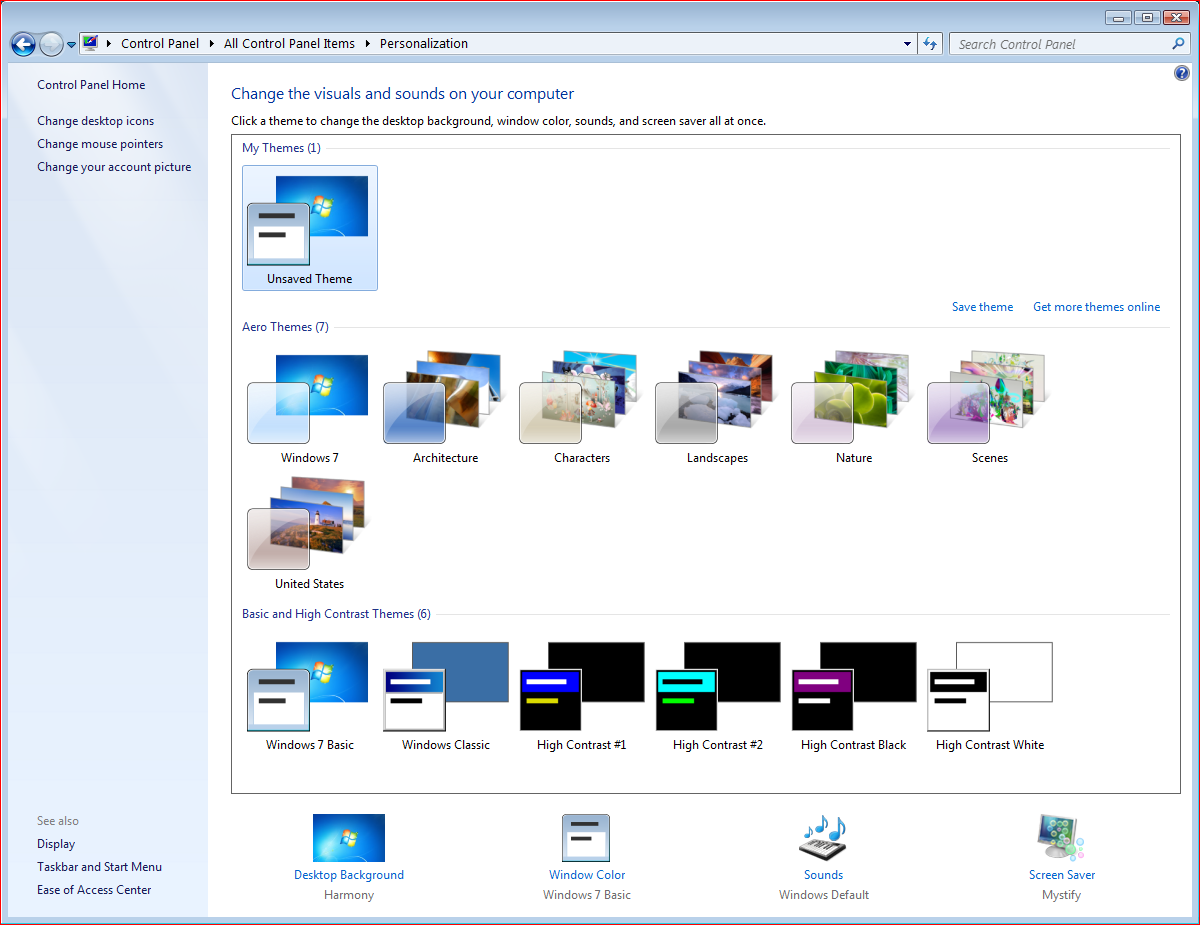
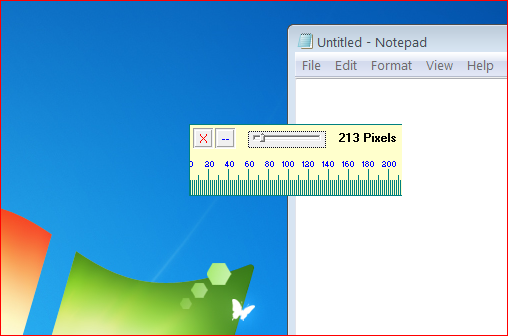
erikleunissen added on 2020-10-07 06:55:45: What's the value of the "Border Padding" option with the Windows 7 Basic theme on your computer? (See my post on 2020-10-06 21:17:31, and my screenshot of the Control Panel) Or with any theme on your computers? bll added on 2020-10-06 21:38:03: Also tried with display size set to 125%; ok. bll added on 2020-10-06 21:30:25: Yes, it's all the same on my win7. erikleunissen added on 2020-10-06 21:17:31: It's the Windows 7 Basic theme. This theme has a relatively wide border by default. If I select that theme, and subsequently click on the "Window Color" icon, I can see detailed configuration options. One of these is "Border Padding", whose value is 4 by default. This is different from the Windows Classic theme, whose setting for Border Padding appears to be 0 by default. bll added on 2020-10-06 21:14:25: Actually, the two themes I had saved off were Basic and Aero. They both work fine. And I tried classic and it is fine. I have no idea how to get a binary file out of fossil, but it seems unnecessary, as the theme consists of the background, window theme (basic, classic, aero, various high-contrast), sound selection and screen saver. Just tried high-contrast, no issue. erikleunissen added on 2020-10-06 21:02:24: I attached another screenshot displaying the theme selection screen in the Windows 7 Control Panel. It appears I have a theme "Unsaved theme", which resembles the "Windows 7 Basic theme" in the lowest row of Basic and High contrast themes. It also appears that you can save a theme for sharing (right-click on the theme for the pop-up menu). I did exactly that and called it "my_theme.themepack" (also attached). Maybe you can reproduce if you: - select the Windows 7 Basic theme if that is also available to you - install the attached "my_theme.themepack" (never done such a thing myself) bll added on 2020-10-06 20:47:28: I tried with both the aero theme and the classic theme on win7 with the same results. erikleunissen added on 2020-10-06 20:42:11: I don't know how this can. Maybe we have different themes or so? I attached a screenshot of the window decorations on my Windows 7. You may want to zoom in to better count the pixels on the ruler. bll added on 2020-10-06 19:12:09: The leave events were generated when I moved the mouse (which was not in the
Tk window). So I cannot re-create.
Windows 7/32, Tcl/Tk 8.6.10:
Width of the left decorative border: 3
moved into pixel 1 of the wm border:
moved one down:
moved into pixel 2 of the wm border:
moved one down:
moved into pixel 3 of the wm border:
moved one down:
Entered window:
|<Enter>|103|229|
winfo rootx . : 103
|<Leave>|366|453|
^C
Windows 7/64, Tcl/Tk 8.6.10:
Width of the left decorative border: 3
moved into pixel 1 of the wm border:
moved one down:
moved into pixel 2 of the wm border:
moved one down:
moved into pixel 3 of the wm border:
moved one down:
Entered window:
|<Enter>|103|229|
winfo rootx . : 103
|<Leave>|524|454|
^C
fvogel added on 2020-10-06 19:03:45: OK. Removing this test, here is the output I see (on Vista):
Width of the left decorative border: 3
moved into pixel 1 of the wm border:
moved one down:
moved into pixel 2 of the wm border:
moved one down:
moved into pixel 3 of the wm border:
moved one down:
Entered window:
        |<Enter>|103|227|
winfo rootx . : 103
No issue. How can you have more pixels in your border on Win7? erikleunissen added on 2020-10-06 08:08:03: Inspecting my script, I believe that the condition below can be removed:
if {$wm_decoration_border_width < 4} {
puts "Didn't expect this width. Adapt the script yourself."
exit
}
I put it there for a previous version of the script where I went from the middle of the left wm border to the left and the right, and wanted to prevent accidentally moving out of the border.
The current version of the script simply goes one way: from left to right and enters the root window in the last step, which is deliberate.
fvogel added on 2020-10-06 06:55:07: For me, on either Vista or Win10, the "Width of the left decorative border" is 3 pixels, which is a case of early exit of the example script. I can't test on Windows 7 for which the report was made, but I was not expecting this window border size to be different. Looks strange. | |||
Attachments:
- my_theme.themepack [download] added by erikleunissen on 2020-10-06 21:03:34. [details]
- screenshot_theme_selection.png [download] added by erikleunissen on 2020-10-06 21:03:21. [details]
- screenshot.png [download] added by erikleunissen on 2020-10-06 20:42:51. [details]
- exercise.tcl [download] added by erikleunissen on 2020-10-04 22:34:44. [details]