| Ticket UUID: | a4508be8f399b24600d744d9f6725a569093e756 | |||
| Title: | ttk:spinbox arrows are not centered in the entry | |||
| Type: | Bug | Version: | 8.6 | |
| Submitter: | anonymous | Created on: | 2017-07-13 19:42:40 | |
| Subsystem: | 17. [spinbox] | Assigned To: | nobody | |
| Priority: | 5 Medium | Severity: | Cosmetic | |
| Status: | Open | Last Modified: | 2026-09-25 01:33:26 | |
| Resolution: | None | Closed By: | nobody | |
| Closed on: | ||||
| Description: |
I couldn't find a ticket like mine, but I may have missed it. I am using Tk 8.6 on Windows 10 through Tkinter. To be clear I am using the ttk::spinbox. I programmed in the widget myself. The issue is that the spinbox buttons aren't centered within the entry it seems as the top of the up arrow button is cut off. This is not the case in tk::spinbox. Included are picture to illustrate my point. Unfortunately the pictures must be zoomed in quite a ways. http://imgur.com/KpPCtId | |||
| User Comments: |
bohagan added on 2026-09-25 01:33:26:
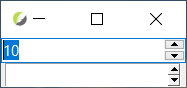
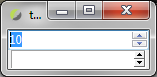
I tested with the latest Tk 9.1 with the vista_theme_improvements branch. Win 10 seems fine, but win 7 still has some clipping. See the 2 new attachments (ttk on top). This may be an artifact of the size. Since we use the Windows theme API to draw these, I'm not sure there is anything we can do. nemethi (claiming to be Csaba Nemethi) added on 2026-09-23 18:30:41: Unfortunately, I no longer have access to Windows 10. On Windows 11, with Tk 8.6.18, 9.0, and 9.1, both arrow elements are displayed for me as expected. oehhar added on 2026-09-18 07:31:35: I think, Csaba and Brian have revised this, at least in 9.1. Csaba, may you double-check? Thanks for all, Harald serhiy.storchaka added on 2026-09-17 21:28:41: Cannot reproduce on Windows 11 with Tk 8.6.18 or 9.1 (vista theme): both arrow buttons of ttk::spinbox are drawn completely and the arrows are centred, at 100 % and 133 % scaling and even with a 14-pixel-high field. The spinbox elements in vistaTheme.tcl and the vsapi element code have not changed since 8.6.7, so this looks specific to the Windows 10 visual style. Is it still visible on Windows 10 with a current Tk? If not, this can be closed. fvogel added on 2017-07-13 20:30:10: I can reproduce on Vista just by: package require Tk pack [spinbox .tks] pack [ttk::spinbox .ttks] Yes, you need to zoom in the image to see this. It does not happen for all themes, for instance alt and clam are OK. | |||
Attachments:
- Spinbox_win10_tk9.1.png [download] added by bohagan on 2026-09-25 01:27:16. [details]
- Spinbox_win7_tk9.1.png [download] added by bohagan on 2026-09-25 01:27:16. [details]
- KpPCtId.png [download] added by fvogel on 2017-07-13 20:27:13. [details]