| Ticket UUID: | 8ced540e06fe830b839d6dbff32ef23c05eba675 | |||
| Title: | ttk::combobox artifacts Win 10 | |||
| Type: | Bug | Version: | 8.6.10 | |
| Submitter: | Takamoto | Created on: | 2020-05-28 21:20:32 | |
| Subsystem: | 88. Themed Tk | Assigned To: | nobody | |
| Priority: | 5 Medium | Severity: | Minor | |
| Status: | Closed | Last Modified: | 2026-10-22 17:22:38 | |
| Resolution: | Works For Me | Closed By: | serhiy.storchaka | |
| Closed on: | 2026-09-30 16:41:04 | |||
| Description: |
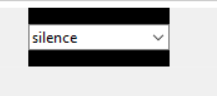
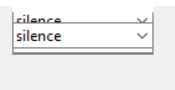
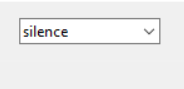
In my application, on Windows 10 I am experiencing the following artifacts with a ttk::combobox. Pic 1: shows the ttkBrowseEntry displayed correctly Pic 2: shows it when I resize the main application Pic 3: shows it if the application is minimized, i.e. hidden from the Desktop, and restored. The black area should correspond to the hight of the containing Frame | |||
| User Comments: |
serhiy.storchaka added on 2026-09-30 16:41:04:
There is no script to reproduce this. A ttk::combobox packed with -side left -anchor e -fill both -padx 10 into a taller frame, as described above, is painted completely on Windows 11 with 8.6.18 and 9.1, in the vista and winnative themes, after resizing and after minimizing and restoring the window: its field fills the whole height. The screenshots show a combobox which is not stretched to the height of its window, so the rest of the window is never painted. If this still happens with a current version, please reopen the ticket with a Tcl script that reproduces it. Takamoto added on 2020-05-29 08:54:07: Thanks chrstphrchvz, for pointing to Tcl::pTk. I did not notice that the widget name was different :) (I changed the topic name now). I posted the issue here, since I 'believe' it has nothing to do with the Perl wrapper. My UI is very complex, but I will try to replicate it in a minimal script in Tcl syntax. In a nutshell, I use pack, the artifacts seem to appear only in combination of resizing the application which implies the containing frame to move on the screen, the artifacts or wrong background appears only inside of the space allotted to the combobox. The pack for the combobox is "-side left -anchor e -expand 0 -fill both -padx 10 Note that because of the geometry of the UI, the combobox is smaller than the containing frame so the pack manager will have to "fill" the remaining vertical space. The issue does not happen if I set -fill none . chrstphrchvz added on 2020-05-28 23:51:27: ttkBrowseEntry is a compatibility wrapper for using ttk::combobox from Tcl::pTk. I think very little is being done by the wrapper such that I don't think this is a Tcl::pTk bug, but reporting it here might first require showing how this issue can be replicated using Tcl syntax (if a Perl syntax example can be provided, that might be enough for me to come up with a Tcl equivalent). I'm mainly curious which geometry manager and arguments are used. I believe the screenshots show Tk should be drawing a background color but isn't, either where (what look like) leftover/stale drawing artifacts appear when the toplevel is resized, or where the black area appears after doing minimize/restore. | |||
 Home
Timeline
Branches
Tags
Forum
Tickets
Download
Wiki