| Ticket UUID: | 19fb7a38fc93bdfb53ff2ccee19825cd30973a4e | |||
| Title: | Messagebox on macOS uses incorrect icons | |||
| Type: | Bug | Version: | 8.6 | |
| Submitter: | ericwb | Created on: | 2020-12-31 21:04:59 | |
| Subsystem: | 38. [tk_messageBox] | Assigned To: | kevin_walzer | |
| Priority: | 5 Medium | Severity: | Important | |
| Status: | Closed | Last Modified: | 2021-01-04 21:10:20 | |
| Resolution: | Fixed | Closed By: | kevin_walzer | |
| Closed on: | 2021-01-04 21:10:20 | |||
| Description: |
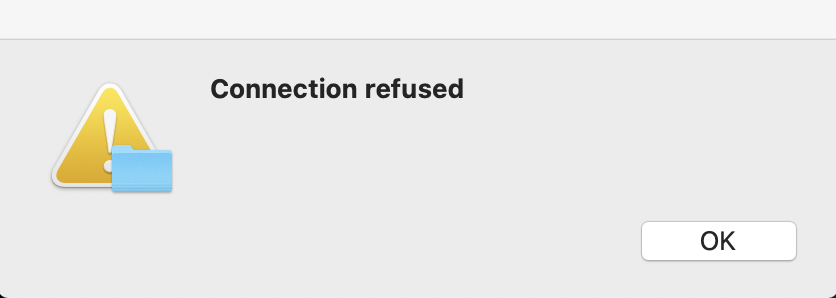
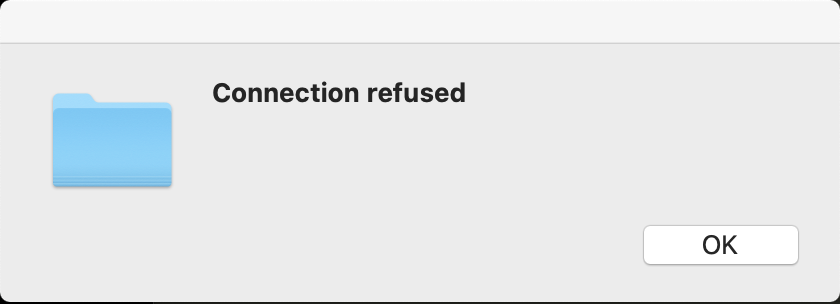
I first noticed this on Python tkinter, but also see same behavior in ActiveTcl. When displaying a messagebox, the icon is displayed as a folder icon whether I create a messagebox using info, error, question. The only icon that differs from a folder icon is the warning message box. For it, a yellow yield icon is displayed with a smaller folder icon on bottom right. Maybe this is a result of the macOS version in use. I've seen this behavior on macOS Catalina 10.15.7 and macOS Big Sur 11.1. I even downloaded and installed ActiveTcl and ran the Wish Widget Demo. I clicked on the Message Box Demostration and observe the same incorrect icons on message box dialogs. | |||
| User Comments: |
kevin_walzer added on 2021-01-04 21:10:20:
Marc, thanks for the fix. @ericwb - after looking at the docs again, I think it's sufficient - it's pulling whatever image the platform uses for that sort of message, and doesn't say anything about a custom image. (The NSAlert docs say this, but that's not germane to Tk's docs.) Closing this as fixed and thanks for the input! ericwb added on 2021-01-04 19:15:21: For me, the main concern was the confusion around what to expect when using the messagebox. I falsely assumed I could create a messagebox with an error icon due to the way it's documented. I think it would help if the docs noted that on macOS the dialog will look different and some icons and function will have no effect on the visual outcome of the displayed panel. marc_culler (claiming to be Marc Culler) added on 2021-01-04 13:46:20: Kevin, I think this ticket can be closed now, because I think the core issue was how Tk handles the situation where an Application is missing its icon specification. That was indeed wrong but has now been fixed, or at least improved. marc_culler (claiming to be Marc Culler) added on 2021-01-03 18:02:03: I managed to reproduce this. If there is no icon file specified in an Info.plist then Tk tries to set the ApplicationIcon to be the feather icon from the Tk framework. But this does not work completely. Specifically, the standard About dialog looks for an *named image* NSApplicationIcon. Apparently when an image is specified in the Info.plist it gets loaded and named NSApplicationIcon. But just calling setApplicationIcon does not set the name for the image. So the StandardAboutPanel does not find an icon to use, and defaults to using the Folder icon. I found that I could get Tk to correctly use the feather icon in this situation if I just set the image name to @"NSApplicationIcon" before calling setApplicationIcon. This is a 1-line change. I am opening a bugfix branch which includes that change. This may well be a behavior change that Apple introduced with Catalina. I am not sure. marc_culler (claiming to be Marc Culler) added on 2021-01-03 03:54:37: I believe that the folder icon is the default, and so it gets displayed when macOS cannot find an application icon. For example, if the icon file is missing from an application bundle then I think the application icon displayed in a dialog will be the folder icon. kevin_walzer added on 2021-01-01 16:51:07:
The screenshots you posted were the pre-Big Sur style of dialog - the bold text is the "message" part, and has looked that way for 15 years or more. The "detail" part was added more recently, and it is the smaller-font display in the old dialog. I also believe the folder icon that's being displayed is some sort of error on your installation, as I cannot reproduce it on my system. The tk_messageBox icons for "alert", "info" and "error" are all the app icon - Wish is just using the system API here. Because NSAlert only puts a different icon for "warning," Wish follows suit. I'm not sure this is a bug, but if you want to provide some sort of documentation patch, I'd be glad to review it. I'm also not sure that anything else you describe is anything that needs changing because, again, it's the system API. That's how Wish works on both the Mac and Windows. I believe the documentation can be still be considered correct even allowing for variations in the implantation details on different platforms. marc_culler (claiming to be Marc Culler) added on 2021-01-01 13:48:24: If I understand this correctly, it seems that Tk is behaving the way that Apple's Human Interface Guidelines say that it should behave. But that behavior is not documented in the man page. A reasonable guess would be that the behavior results from the fact that Tk is using Apple's NSAlert object. I think this means that the the man page needs to be updated. The other stylistic critiques would seem more appropriate for an RFE. ericwb added on 2021-01-01 07:08:31: I think this is a behavior (maybe new) of macOS. According to: https://developer.apple.com/design/human-interface-guidelines/macos/windows-and-views/alerts/ "The system automatically shows your app icon on an alert. Custom icons are also supported. A caution symbol can be appended to the icon in alerts that require extra attention." So really just two default options according to Apple, unless an image is passed. That's consistent with what I'm seeing, but inconsistent with tcl-tk docs. The reason I suspect this might have changed in macOS, is that there is also this: https://developer.apple.com/documentation/appkit/nsalert/style Which gives me the impression there were three styles with three icons. There are other style issues I think. The messageText is more like a title in the way macOS renders it. The informationText is more like the body of the alert. Tcl should probably change accordingly. bll added on 2021-01-01 00:40:00: The warning display for me gets the exclamation point in the yellow triange with a tcl feather overlaid. The other three have just a tcl feather. Running 8.6.10 on catalina. ericwb added on 2020-12-31 21:43:10: I reproduced with: ActiveTcl-8.6.9.8609.2-macosx10.9-x86_64-93b04018.pkg and tcl-tk: stable 8.6.10 (bottled) [keg-only] kevin_walzer added on 2020-12-31 21:32:18: Unable to reproduce using the tip of core-8-6-branch. What version of Tcl/Tk are you using? If you are using ActiveTcl or the version of Tk bundled with Python, it's probably a bit old. | |||
Attachments:
- Screen Shot 2020-12-31 at 11.08.10 PM.png [download] added by ericwb on 2021-01-01 07:09:48. [details]
- Screen Shot 2020-12-31 at 11.08.25 PM.png [download] added by ericwb on 2021-01-01 07:09:10. [details]