| Ticket UUID: | 1432915 | |||
| Title: | Widget borders in canvas wrong with OS X | |||
| Type: | Bug | Version: | obsolete: 8.4.12 | |
| Submitter: | setok | Created on: | 2006-02-16 14:38:26 | |
| Subsystem: | 02. Appearance | Assigned To: | aku | |
| Priority: | 5 Medium | Severity: | Minor | |
| Status: | Pending | Last Modified: | 2026-09-25 14:26:13 | |
| Resolution: | None | Closed By: | nobody | |
| Closed on: | ||||
| Description: |
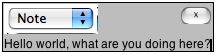
There seems to be some 'leakage' in graphical elements when widgets are involved in a canvas and the surrounding border is thus not updated properly. I have attached an example where you can clearly see what has resulted when I moved this group of items around the screen. The border of the tk_optionMenu has become messed up with what appears to be elements of the graphics around it. In the same example you can also see how a button with a small font size looks like it is missing something. The bottom of the bottom appears as if it has just been cut out. It lacks the natural border around the button. The optionMenu was created without any later tweaking and the button was created with -highlightthickness 0 and -borderwidth 0. The options for the button do not effect the appearance of the actual button in this case. The platform is OS X 10.4.4 / Aqua. | |||
| User Comments: |
kevin_walzer added on 2026-09-25 14:26:13:
I need a sample script, not just a screen shot, to test this. serhiy.storchaka added on 2026-09-25 11:57:10: The Carbon drawing code shown here has been replaced since the Cocoa port, and several redraw problems with windows embedded in a canvas were fixed recently (e.g. [61cb40b01b]). Can someone on macOS check whether moving an optionmenu and a small button in a canvas still leaves artifacts with 8.6.18 or 9.0? setok added on 2006-02-16 21:38:28: File Added - 167697: Example of widget border problems in canvas.png | |||
Attachments:
- Example of widget border problems in canvas.png [download] added by chrstphrchvz on 2020-07-19 23:00:12. [details]