|
2026-07-21
| ||
| 09:54 | • Closed ticket [fe932e45]: Scaling on aqua gets unexpectedly reset plus 7 other changes artifact: a6fa7c4e user: nemethi | |
| 09:38 | Fix for [fe932e457]: Scaling on aqua gets unexpectedly reset. check-in: dec50936 user: csaba tags: core-9-0-branch | |
| 09:30 | Fix for [fe932e457]: Scaling on aqua gets unexpectedly reset. check-in: eefcafad user: csaba tags: trunk, main | |
|
2026-07-19
| ||
| 14:04 | • Ticket [fe932e45] Scaling on aqua gets unexpectedly reset status still Open with 4 other changes artifact: e39721fb user: marc_culler | |
| 09:59 | • Ticket [fe932e45]: 5 changes artifact: ac1e8df1 user: nemethi | |
| 02:49 | • Ticket [fe932e45]: 3 changes artifact: b08d94e3 user: bohagan | |
|
2026-07-18
| ||
| 23:28 | • Ticket [fe932e45]: 4 changes artifact: b3f54138 user: marc_culler | |
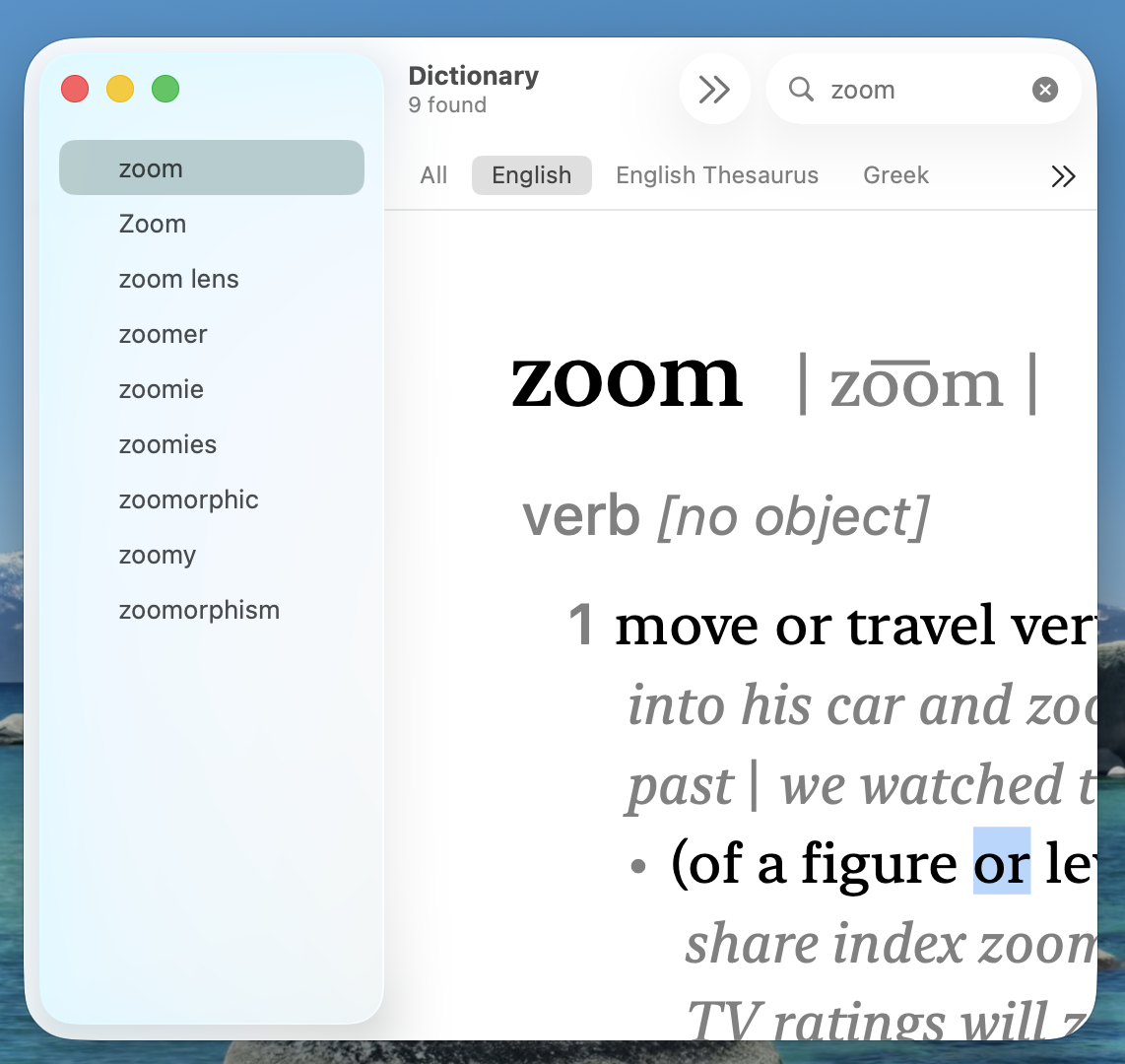
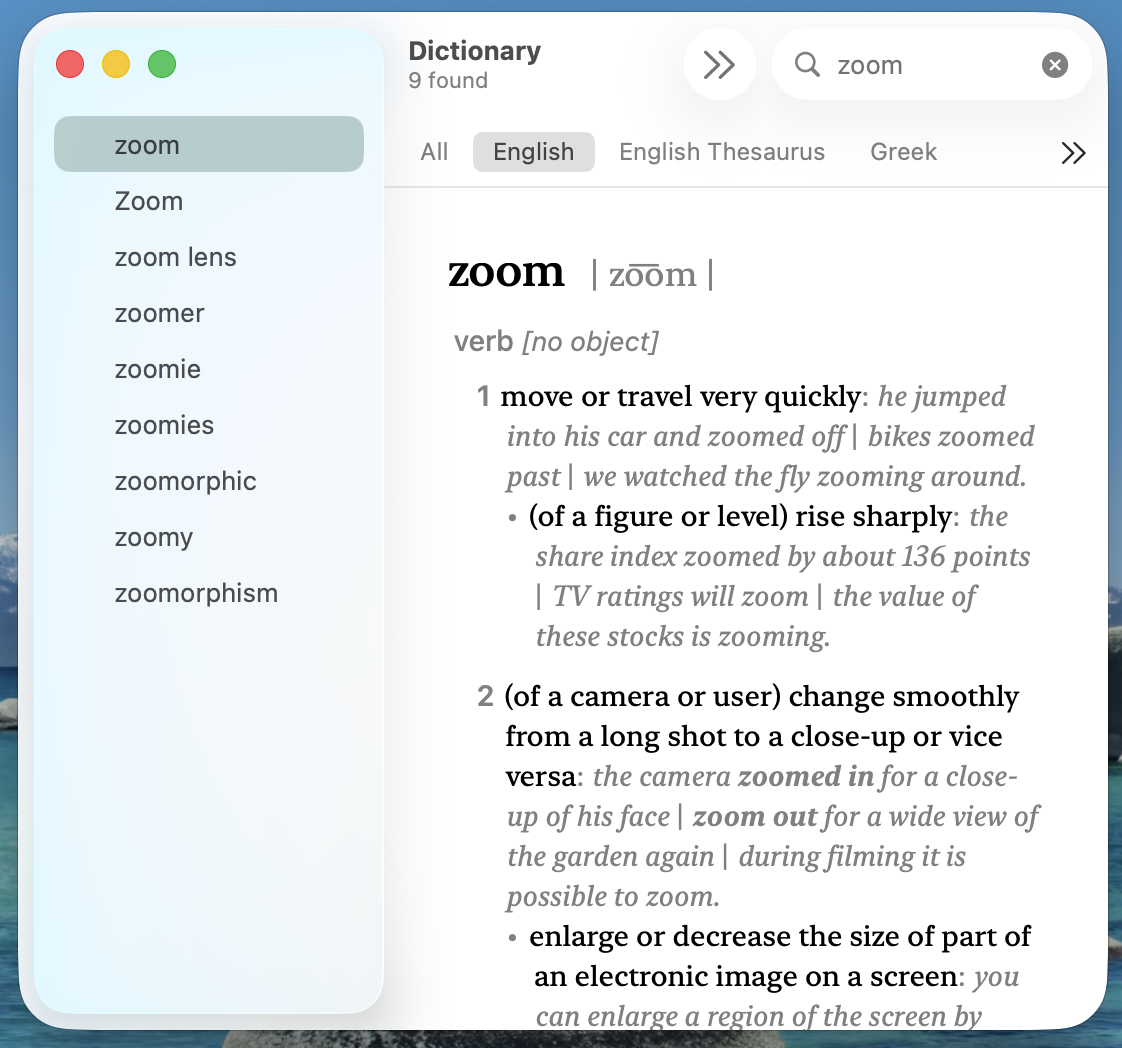
| 23:11 | • Add attachment DictionaryZoomed.png to ticket [fe932e45] artifact: 8e56b5e5 user: marc_culler | |
| 23:11 | • Add attachment Dictionary.png to ticket [fe932e45] artifact: 4d4b38b3 user: marc_culler | |
| 23:08 | • Ticket [fe932e45] Scaling on aqua gets unexpectedly reset status still Open with 4 other changes artifact: 9a1624fb user: marc_culler | |
| 22:29 | • Ticket [fe932e45]: 3 changes artifact: 677d6452 user: bohagan | |
| 21:22 | • Ticket [fe932e45]: 4 changes artifact: 35b608e6 user: marc_culler | |
|
2026-07-17
| ||
| 16:27 | • Ticket [fe932e45]: 4 changes artifact: 85757504 user: oehhar | |
|
2026-07-15
| ||
| 20:09 | • Ticket [fe932e45]: 4 changes artifact: e254e2a2 user: marc_culler | |
| 16:22 | • Ticket [fe932e45]: 4 changes artifact: e2dbd91f user: nemethi | |
|
2026-07-14
| ||
| 22:25 | • Ticket [fe932e45]: 4 changes artifact: dfdaaf0d user: marc_culler | |
| 20:33 | • Ticket [fe932e45]: 4 changes artifact: 90d72926 user: marc_culler | |
|
2026-07-13
| ||
| 17:34 | • Ticket [fe932e45]: 4 changes artifact: 5536ed64 user: nemethi | |
| 16:38 | • Ticket [fe932e45]: 4 changes artifact: 502472da user: oehhar | |
| 16:08 | • Ticket [fe932e45]: 4 changes artifact: 1bfd419a user: nemethi | |
| 15:58 | • Add attachment diff.out to ticket [fe932e45] artifact: 3aff02c5 user: nemethi | |
| 15:58 | • Add attachment themes.tcl to ticket [fe932e45] artifact: b76b5789 user: nemethi | |
| 15:52 | • New ticket [fe932e45] Scaling on aqua gets unexpectedly reset. artifact: 29f26d14 user: nemethi | |
| Ticket UUID: | fe932e457f4e226c22c5eb009fcf691135fa3e00 | |||
| Title: | Scaling on aqua gets unexpectedly reset | |||
| Type: | Bug | Version: | main (9.1b01) | |
| Submitter: | nemethi | Created on: | 2026-07-13 15:52:29 | |
| Subsystem: | 66. Aqua Window Operations | Assigned To: | nemethi | |
| Priority: | 5 Medium | Severity: | Severe | |
| Status: | Closed | Last Modified: | 2026-07-21 09:54:41 | |
| Resolution: | Fixed | Closed By: | nemethi | |
| Closed on: | 2026-07-21 09:54:41 | |||
| Description: |
While working on the enhanced treeview implementation, Brian has made most Ttk widgets of the OTOH, when running the attached script The culprit is the The attached | |||
| User Comments: |
nemethi (claiming to be Csaba Nemethi) added on 2026-07-21 09:54:41:
Fixed by commits [eefcafad] and [dec50936] in main and core-9-0-branch. marc_culler (claiming to be Marc Culler) added on 2026-07-19 14:04:15: There is a trade-off between giving the developer maximum flexibility and maintaining a consistent style; the outcome being especially important when emulating a documented "native" style. Ttk deals with this very explicitly, and its resolution was not to make it easy for the developer to do anything he or she wants in any situation. Here is an extremely basic example (for Aqua): % ttk::frame .f -background purple unknown option "-background" Ttk does not allow purple frames in the Aqua theme, whereas Tk allows anything: % frame .f -background purple .f Q: Why shouldn't an app using the Aqua theme be allowed to have a purple frame? A: Because it is not consistent with the Aqua theme. The same reasoning applies to all aspects of a theme, and the decision about what to make mutable and what to restrict needs to be made thoughtfully. Allowing a developer to do anything is not the approach that Ttk has taken, and that choice has been a great benefit for Tk, changing it from an old-fashioned clunky UI toolkit into something that can generate script driven apps that look like the real thing. nemethi (claiming to be Csaba Nemethi) added on 2026-07-19 09:59:26: Assigned to myself. IMHO, the proposed fix is technically OK and independent of the possible conclusion from the valuable discussion started by Marc. I am going to commit the fix within the next few days. bohagan added on 2026-07-19 02:49:29: I'm probably not the best person to answer that since I don't have a Mac, only an old High Sierra VM. My take on it is that is why I called it a wrapper, since the app developer can decide if the zoom applies to just a widget like the canvas (call scale fn) or to the app as a whole (use tk scaling). marc_culler (claiming to be Marc Culler) added on 2026-07-18 23:28:07: Here is a test challenge: Name one Apple app which allows the user to increase the size of a push button, or a check box, or any other widget. marc_culler (claiming to be Marc Culler) added on 2026-07-18 23:08:58: > In short, we should provide the same capabilities as other GUI toolkits. OK. But in the case of Aqua and Ttk I think the first GUI toolkit on the list should be Apple's AppKit. And I don't think that necessarily means making all ttk widgets zoomable. I think some careful thought about how to do this would be appropriate, along with more discussion than one zoom meeting at noon UTC. I will give an example. I will post two screenshots when I finish writing this. They are both from the same window in Apple's Dictionary.app. One is taken after looking up the word "zoom" and the other after performing the two finger spread gesture on my trackpad. You will see that the **text** in the window gets enlarged. You will also see that all of the buttons and the clickable text in the left column **stay the same size**. For Apple, pretty clearly, the zoom operation is about making text larger. It is not about making buttons, labels or widgets larger. Another thing that will require some thought and discussion is how to modify Tk so that it becomes aware on a per-window basis of the resolution of the monitor on which the window is displayed. bohagan added on 2026-07-18 22:29:53: Just to clarify, we're talking about per-app "zooming" (and text resizing) on the Mac which is done by either pinch/unpinch gestures on trackpads and via keyboard shortcuts like Cmd-plus and Cmd-minus. It's a commonly supported function. Harald is also referring to a presentation at the Euro conference where someone ported AndroWish to the iPadOS environment and the need for proper scaling for touch (as opposed to desktop) interfaces is critical. Lastly, my take is scaling in this context means we should support:
In short, we should provide the same capabilities as other GUI toolkits. marc_culler (claiming to be Marc Culler) added on 2026-07-18 21:22:15: > People using full screen touch enabled applications really appreciate > an augmented application. So, a general zoom factor is seen as beneficial > for this application. Apple does not produce any laptops or desktops with touch screens, as far as I know. And I am not aware of any iPad applications that use Tk. Also I don't know what an "augmented" application is. Did the panel really discuss the situation with macOS in detail? When was that meeting? It is OK for Tk to have "unique" features until those features make people not want to use it because it looks "klunky". And that is something that people have been saying about Tk for a long time. Consequently, even the chatbots support this idea. This is what Gemini told me: "Yes, Tk (and its Python counterpart, Tkinter) is widely considered klunky in terms of its visual appearance and developer experience." Adhering to the HIG leads to applications which look native, not "klunky". oehhar added on 2026-07-17 16:27:16: Dear Marc, we have elaborated the question at the tk pannel. People using full screen touch enabled applications really appreciate an augmented application. So, a general zoom factor is seen as beneficial for this application. It might be seen as a unique feature be Tk... Thanks for all, Harald marc_culler (claiming to be Marc Culler) added on 2026-07-15 20:09:22: Hi Csaba, If you look at the blame for macosx/tkMacOSXXStubs.c you will see that the only change I ever made to it was to fix a small typo in one comment. (And then Jan added my name to the copyright - who knows why?) The function tkMacOSXDisplayChanged appears to have been added by hobbs around 2005. However, I am able to read the code. When I do that I see that there is a notification enabled for the TKApplication object like this: observe(NSApplicationDidChangeScreenParametersNotification, displayChanged:); So the displayChanged method of TKApplication handles that particular notification from the system. And it handles it by calling TkMacOSXDisplayChanged. It is not called anywhere else. I don't know why that function is defined in tkMacOSXStubs.c. I guess the reason might be because TkWinDisplayChanged is defined in tkWinX.c. Anyway, the Apple documentation for NSApplicationDidChangeScreenParametersNotification says: "Posted when the configuration of the displays attached to the computer is changed." and in the discussion below they say: "The configuration change can be made either programmatically or when the user changes settings in the Displays control panel." I'm sorry to say that I have no information about when Apple sends that notification beyond what it says in the Apple documentation. I strongly suspect, however, that back in 2005 when hobbs wrote that code he was not thinking about Apple computers with multiple monitors. Now that is a very common thing. So people adding features to Tk should be thinking about it. nemethi (claiming to be Csaba Nemethi) added on 2026-07-15 16:22:20: Thanks for your comments, Mark! I understand your concerns, but I was hoping that you can tell why the BTW: I have a 4K monitor connected to a Mac Mini. The macOS System Settings application just offers a list of the possible resolutions and lets the user select one of them. marc_culler (claiming to be Marc Culler) added on 2026-07-14 22:25:02: Another concern that I have is that WidthMMOfScreen and HeightMMOfScreen do not produce meaningful numbers if there are more than one monitor. There is only one "screen" in the macOS port and there is one screen coordinate system which includes all of the monitors. The unit of that coordinate system is called a "point", and a square with sides equal to 1 point may be covered by 1 or 4 pixels, depending on whether the monitor is a "retina monitor". Apple apparently does not attempt to interpret the pixel dimensions as being dependent on the monitor resolution. I find that with two monitors of different resolutions when I drag a window from the higher resolution monitor to the lower resolution monitor it gets bigger. So I guess they display everything on a non-retina monitor as if a pixel has 1 point sides. I don't know what happens with a high-dpi monitor - does Apple somehow treat it as if it were a retina monitor? And how does ttk determine WidthMMOfScreen when there are multiple monitors? Does it use the "primary" monitor, which I guess might be defined as the one on which the root opened, or possibly the one which contains the origin of the screen coordinate system in its lower left corner. I know that the dock can be displayed on either monitor when there are two. I don't know whether that affects which one is "primary". marc_culler (claiming to be Marc Culler) added on 2026-07-14 20:33:17: One concern that I have is that Ttk is supposed to be providing widgets that look and behave like native widgets, and I don't think that scaling native Aqua widgets is consistent with the Apple Human Interface Guidelines. In particular, I believe that the native Apple Push Button has a very specific size, specified in the HIG. And I don't know of any native Apple apps which allow the user to change the size of the buttons within that app's windows. A consistent appearance seems to be a core principle in the HIG. I note that scaling the entire screen is supported. That is different from changing the size of a specific system widget, as displayed in one app, compared to how it is displayed in other apps. nemethi (claiming to be Csaba Nemethi) added on 2026-07-13 17:34:31: Thanks Harald, but I see no necessity for a branch here. I am going to keep the ticket open for the next few days, waiting for possible comments from the Mac experts. oehhar added on 2026-07-13 16:38:53: Great work! Shall I put it in a branch? Thanks for all, Harald nemethi (claiming to be Csaba Nemethi) added on 2026-07-13 16:08:50: Update: The proposed fix should be applied to | |||
Attachments:
- DictionaryZoomed.png [download] added by marc_culler on 2026-07-18 23:11:16. [details]
- Dictionary.png [download] added by marc_culler on 2026-07-18 23:11:16. [details]
- diff.out [download] added by nemethi on 2026-07-13 15:58:39. [details]
- themes.tcl [download] added by nemethi on 2026-07-13 15:58:39. [details]